


- Contents
Interaction Attendant Help
Hierarchical Relationships in the Tree
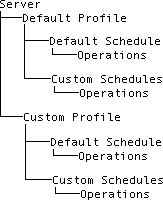
Attendant enforces a hierarchical relationship between nodes in the tree. It uses simple rules to determine the order of items, and the options that are available in menus and toolbars. The figure below shows the relationship between servers, profiles, schedules, and operations. The basic structure is: Server > Profile > Schedule > Operation.
-
The highest-level node is a Server that you have connected (logged in) to. If you connect to more than one server at a time, nodes for servers are siblings in the tree.
-
Attendant attaches a default Profile below each server, to processes calls that do not match custom profiles. When you add your own custom profiles to filter calls based upon ANI, DNIS, Line Group, Line, and other criterion, they are listed at the same level as the default profile.
-
Schedules are attached below profiles. Attendant attaches a default schedule to each profile, in case none of your schedules are selected to process the call.
-
Operations are attached to schedules (and in a few cases, to other operations). You can add as many operations as you want to build each menu. The lowest-level items in the tree are the operations that Attendant performs when a caller presses a key. One example of an operation is playing back an audio file. A digit symbol appears next to each operation in the tree, so that you can visually see which key the user must press to select the operation.
Related Topics