


- Contents
Interaction Optimizer Help
Configure Advanced Reforecast Settings
You can configure the expected number of interactions, average interaction time, or average ACW time that is used to reforecast information for the rest of the day.
Configure advanced reforecast settings
-
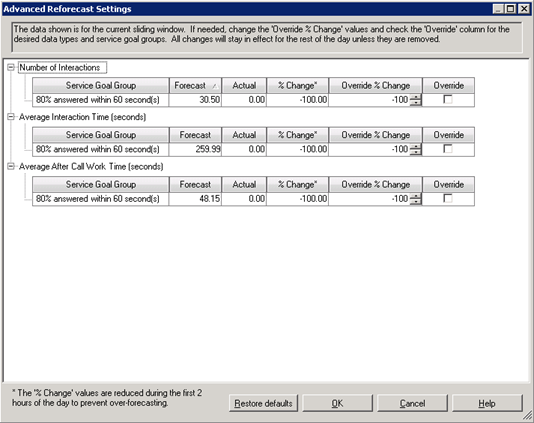
From the Reforecast Settings dialog box, click Advanced to open the Advanced Reforecast Settings dialog box.
-
Do any of the following:
-
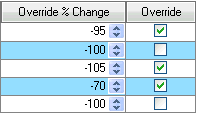
Use the up and down arrows to set the percentage change in override of the default values of the service goal group. When you change the override, the Override checkbox is checked. The Override % Change value is used only when the Override checkbox is checked.
-
Right-click the column headers and select to add columns or deselect to remove columns.
|
Service Goal Group |
The name of the service goal group. |
|
Forecast |
The total of all values forecast for this service goal group during the sliding window time (default value is 4 hours) |
|
Actual |
The total of all actual values for this service goal group during the sliding window time. |
|
% Change |
The percent difference between the Forecast and Actual values during the sliding window time. |
|
Override % Change |
The last set value for the percent difference that is used when calculating reforecasts during the rest of the day if the override checkbox is checked. For example, if Override % Change is set to "5%" and the forecast for some service goal group during a future interval is 100 interactions, then the reforecast will use 105 interactions in its calculations. This value defaults to the rounded value of % Change. |
|
Override |
When checked, then the value of Override % Change is used to calculate the inputs for the reforecast. If unchecked, then the value of % Change is used to calculate the inputs for the reforecast. |
-
Click Restore defaults to clear the override checkboxes and set Override % Change values to the current value for % Change.
-
Click OK to save your changes and return to the Reforecast Settings dialog box.
Notes: This page
allows you to make changes that steers the reforecast in the way you think
is appropriate, however editing these inputs should not typically be necessary,
since the system is gathering data throughout the day to determine how
the interaction volume and average handle time is changing. These settings
are handled at the service goal group level, so changes to one service
goal group do not impact other service goal groups.
An example of when edits might be made: If an electric company has
a major power outage, the forecast number of interactions for the service
department may need to increase dramatically for a portion of the day.
The system may take a few hours to catch up with this increased volume,
but the administrator could act immediately to increase the interaction
volume and reforecast for the next few hours.
