

- Contents
Interaction Process Automation Technical Reference
Optional Server Parameters
In addition to switchover-related server parameters, the following optional server parameters are available. For more information about server parameters, see the Interaction Administrator documentation.
PAS_blockLaunchDuringRestore
Boolean. If the value is True, 1, or Yes, Process Automation Server blocks new user flow starts until it finishes restoring previously existing flows. This action prevents agents from starting extra flows instead of waiting for the restore.
PAS_DepthThreshold
Specify an integer for this parameter to indicate the number of spawned levels that a process can drill down to before Process Automation Server indicates an error for excessive recursion.
PAS_HandlerResponseTimeout
Note: Only processes migrated from Interaction Process Automation 3.0 use this parameter. Interaction Process Automation lets users configure timeout values for each action individually.
Use this parameter with the Run Handler action to specify how long Interaction Process Automation waits before displaying an error for the Run Handler action when the action doesn't run successfully.
| Parameter Value | Description |
|---|---|
|
N |
IPA waits N seconds before displaying an error. |
|
(not set) |
IPA defaults to a wait time of 30 seconds. |
|
0 |
IPA does not display an error. The wait time is unlimited. |
For more information about the Run Handler action, see IPA Designer Help.
PAS Maximum Monitored Flows
Integer. Overrides the default maximum of 5,000 monitored flows in IPA Monitor. Create this parameter in Interaction Administrator's Server Parameters container. If you do not create this parameter and assign a value to it, IPA Monitor uses the default maximum of 5,000 monitored flows. The minimum value is 100.
PAS_LoadBalanceThreshold
This server parameter controls the load balancing of running process instances among off-servers. Set this parameter to the maximum number of process instances that must occur before load balancing occurs between off servers. The default is 5000. Do not set the value of this server parameter to less than 1000.
ConnectIPAEnabled
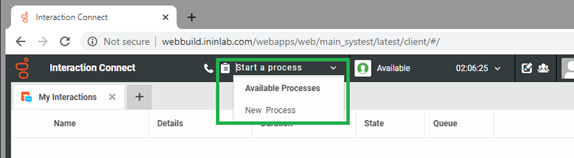
Boolean. If the value is True, 1, true, T, or t, Interaction Connect displays the Start a Process icon. The user can use the icon to start a process by selecting a process from the available processes. If the value is False, 0, or false, Start a Process icon does not appear in Interaction Connect. The default value is False. You must set this server parameter to true to enable IPA support for Interaction Connect.