


- Contents
Interaction Media Server Technical Reference
Configure "Always-in" or "Dynamic" Audio Path for Interaction Media Server
There are two methods of handling call audio streams with Interaction Media Server: dynamic and always-in. The difference in these two methods is how Interaction Media Server interacts with the audio stream.
Always-in audio path
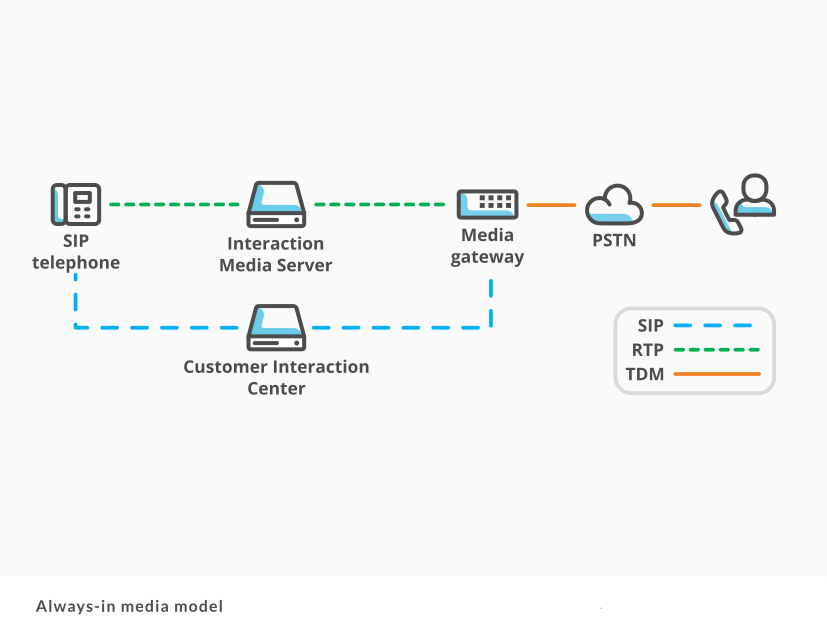
The always-in method specifies that Interaction Media Server receives and retransmits all RTP audio streams associated with Session Initiation Protocol (SIP) lines in the CIC system. CIC controls the SIP messages between SIP devices, as displayed in the following diagram:
Dynamic audio path
The dynamic method specifies that SIP devices, such as SIP telephones and gateways send and receive RTP audio streams directly to each other without using Interaction Media Server. However, if a call requires audio processing from Interaction Media Server, such as an agent choosing to record a call, CIC sends SIP REINVITE packets to the endpoints. The endpoints then send the RTP audio streams to Interaction Media Server, which then records the call. Interaction Media Server also becomes involved in the RTP audio streams for special operations, such as transcryption, transcoding, or playing a media file, such as an audio prompt.

Which audio path method do I use?
The audio method that you choose depends on your usage of Interaction Media Server and how you want calls to behave.
The dynamic method is the default for Interaction Media Server. If you are intermittently recording calls and using special operations, Genesys recommends using this method as it only uses Interaction Media Server when requested. There is a 0.5-second delay that occurs when inserting Interaction Media Server into the audio path.
Note:
If you want the highest performance available for media operations, such as ad hoc recording or recording most calls, Genesys recommends the always-in method. As another example, if you want your customer to hear an agent without any delay, use this method as Interaction Media Server immediately inserts itself in the audio path.
It is important that you analyze your call patterns and how you want to process calls in your contact center environment so that you can choose the most appropriate method.
Set the Interaction Media Server audio path behavior
Set a SIP line so that it uses the necessary audio path method in Interaction Media Server.
To set the Interaction Media Server audio path behavior
-
Open Interaction Administrator and log on with the administrator credentials. The Interaction Administrator main window appears.
-
In the left pane, click the Lines object. A list of defined SIP lines appears in the right pane.
-
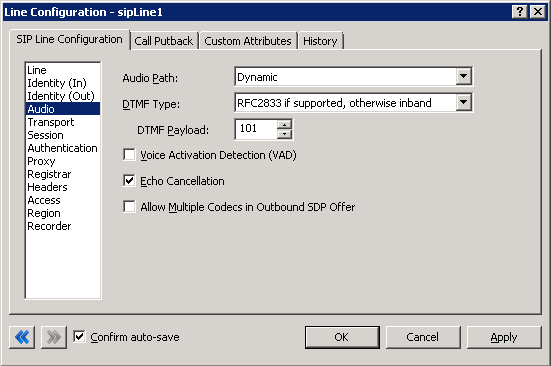
In the right pane, double-click the line for which you want to configure the audio path method. The Line Configuration dialog box appears.
-
In the list on the left side of the dialog box, click the Audio item.
-
In the Audio Path list box, select either Dynamic or Always-In.
-
Click OK.