


- Contents
Interaction Media Server Technical Reference
Interaction Media Server Config-Diagnostics Page
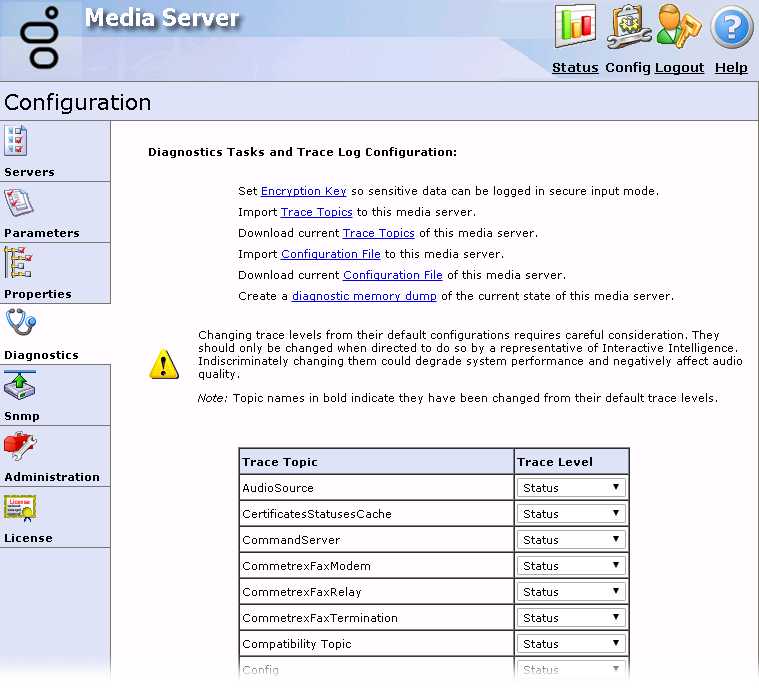
The Diagnostics page allows you to do administrative configuration tasks and set tracing levels for the different components of Interaction Media Server.
Set encryption key
The Set Encryption Key so sensitive data can be logged in secure input mode hyperlink displays a page that allows you to specify a key. Interaction Media Server uses that key to encrypt and decrypt Dual-Tone Multi-Frequency (DTMF) digits in the log file and diagnostic captures. If you do not set this key when you enable the Secure Input feature, Interaction Media Server does not record DTMF digits in the log file or diagnostic captures.

|
Category |
Name of the feature that uses this encryption key. |
|
Instance |
Dynamically-generated string consisting of the name of the Interaction Media Server, the domain, and numeric data representing date and time. |
|
Key |
Key that the encryption algorithm uses to encrypt DTMF digits in diagnostic captures. |
|
Random Key |
Generates an encryption key. The encryption key replaces any key entered in the Key box. |
|
Apply Key |
Sets the encryption key for DTMF digits in subsequent diagnostic captures. |
|
Cancel |
Disregards any changes to the
controls on this page and returns to the Diagnostics
page. Important! If you click Cancel after clicking Apply Key, the system does not remove the encryption key and applies it to DTMF digits in subsequent diagnostic captures. When you set an encryption key for the Secure Input feature on this page, Interaction Media Server does not use the encryption algorithm specified in the RtpDiagnosticCaptureCipherSuite property. Instead, Interaction Media Server uses the AES256_HMACSHA1 cipher suite. Important! If you restart Interaction Media Server, it discards the entered encryption key and returns to the default behavior of excluding DTMF digits in log files and diagnostic captures. |
Import trace topics
The Import Trace Topics to this media server hyperlink allows you to import a file that contains trace level settings and apply them to this Interaction Media Server.
Download current trace topics
The Download current Trace Topics of this media server hyperlink allows you to export the current trace level settings of this Interaction Media Server to a file.
Import configuration file
The Import Configuration File hyperlink allows you to import a configuration file that you earlier exported from this Interaction Media Server.
Note:
Starting with Interaction Media Server 2015 R2, any upgrade from
an earlier version of Interaction Media Server adds a <Version>
element to the configuration file.
You can also import configuration files that you previously exported
from an earlier version of Interaction Media Server. The Import
Configuration File feature in the Config
> Diagnostics section of the web interface automatically
adds the new <Version> element.
By default, the configuration file is at the following path: D:\I3\IC\Resources\MediaServerConfig.xml
Download current configuration
The Download current Configuration File of this media server hyperlink allows you to export all current configuration settings of this Interaction Media Server to a file.
Create a diagnostic memory dump
If your Interaction Media Server develops issues and is not performing as expected, you can use the Create a diagnostic memory dump of the current state of this media server hyperlink to export the Random Access Memory (RAM) associated with the Interaction Media Server process to one or more files. You can send these files to PureConnect Customer Care for troubleshooting.
For more information about creating memory dumps, see Interaction Media Server Memory Dump.
Set tracing levels
Tracing levels control the types of messages that Interaction Media Server writes to the log file, which retains data for seven days.
Caution!
Do not change the default tracing levels without instruction from PureConnect Customer Care. Usually, the default tracing levels provide enough information for PureConnect Customer Care to troubleshoot any problem. If you increase tracing levels, Interaction Media Server can become overloaded and fail to handle simple interaction loads. Also, if you allow Interaction Media Server to run in that state for an extended time, the resulting log files can surpass the storage capacity of the system.
The following table provides the trace level settings and associated descriptions:
|
Tracing Level |
Description |
|---|---|
|
None |
Interaction Media Server does not write any information to the log file. |
|
Critical Error |
Records severe failures that Interaction Media Server cannot correct. |
|
Error |
Records data for the previous setting and minor failures that Interaction Media Server cannot correct. |
|
Warning |
Records data for the previous setting and conditions that impair Interaction Media Server without corrective action. |
|
Status |
Use this setting to record data for the previous setting and for the following information:
|
|
Notes |
Records data for the previous setting and for the following information:
|
|
Verbose Notes |
Records data for the previous setting and for select programmatic values. |
|
Ultra Verbose |
Records events for the previous setting and for most programmatic values. |
|
All |
Records all data from Interaction Media Server operations. |