

- Contents
Interaction Scripter Client User's Guide
Change log
|
Date |
Changes |
|---|---|
|
11-November-2014 |
Starting with this release, Interaction Scripter Client
Win32 Edition is retired. Interaction Scripter .NET Edition
Client is now used exclusively to run base scripts and custom
scripts developed with the Interaction Scripter API. |
|
11-November-2014 |
On Windows Server 2008 only, if Interaction Scripter .NET is minimized and a new call comes in, the agent does not receive any notification in the tray nor does the window pop to the user. Scripter normally maximizes and enters the foreground when a call is received. But on Windows Server 2008, the Scripter Client will not maximize. This is unlikely to be a significant issue, since agents typically do not run a server operating system on their desktop PCs (DIALER-6650). |
|
11-November-2014 |
The ShowDialog command line parameter was removed. Scripter Client always displays the login dialog, unless a -silent command line option is used to suppress the dialog (DIALER-6184). |
|
18-April-2012 |
If a language pack has been installed, Interaction Scripter .NET Client's Login dialog displays an Options tab that allows the user to select a language other than English. For details, see Start Interaction Scripter .NET Client. |
|
18-April-2012 |
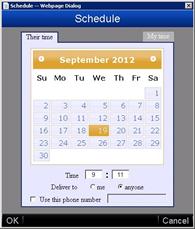
Interaction Scripter Client no longer uses an ActiveX control
to display date\time selection when an agent dispositions a call
to schedule. A JavaScript control is used instead. This
eliminates security issues in Internet Explorer associated with
the ActiveX control. |
|
06-September-2012 |
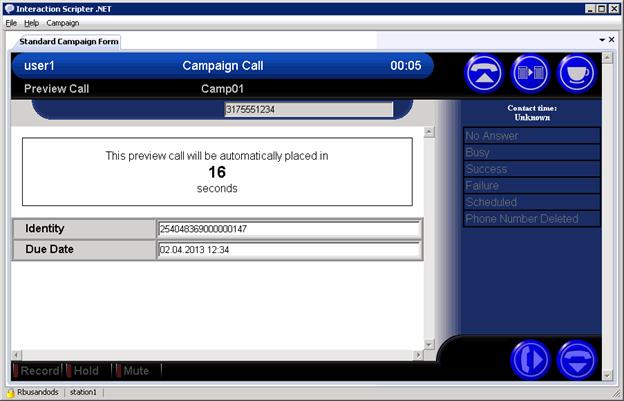
Interaction Scripter now displays a countdown timer that indicates how much time agents have to review the preview pop before the contact is automatically dialed. Agents cannot stop a countdown, but they can skip preview calls as before, if the script provides a Preview Skip option. The preview countdown feature must be configured for the campaign. By default, agents have an unlimited amount of time to review information about each preview call.
|
|
28-February-2013 |
Added a new optional command line parameter, /forcescripturl, to ensure that Scripter loads the correct script when a campaign transition occurs. |
|
04-November-2014 |
Updated documentation to reflect changes required in the transition from version 4.0 SU# to Interaction Dialer 2015 R1, such as updates to product version numbers, system requirements, installation procedures, references to Interactive Intelligence Product Information site URLs, and copyright and trademark information. |
|
10-February-2015 |
Added information about a new command line parameter called AllowMultipleInstances. |
|
10-February-2015 |
Updated the Nostartreceiving topic with information pertaining to the use of the Dialer StartReceivingCalls Per Campaign server parameter. |
|
05-May-2015 |
The Autologin command line parameter, which allows you to configure Scripter to bypass the logon dialog box and automatically log on if a switchover occurs, now provides support for logging on to multiple campaigns. |
|
11-August-2015 |
Slight reorganization of Help system content. |
|
03-November-2015 |
Updated documentation and screen shots to reflect new logo and color scheme. |
|
09-February-2016 |
Added the Advanced
Campaign Management topic to the General Information section. |
|
03-May-2016 |
Slight reorganization of Help system content. |
|
09-August-2016 |
Minor documentation corrections. |
|
01-November-2016 |
Updated access control rights information in To Transfer a Blind Call of the Work with Standard forms section. |
|
01-November-2016 |
Added general information about Follow Up Call feature. |
|
08-August-2017 |
The information in this document pertains to Interaction Scripter .NET Client only. It does not pertain to a new client that runs inside Interaction Connect. For information about Scripter with Interaction Connect, see Interaction Connect Help. |
|
08-August-2017 |
Explained that base scripts and standard forms are interchangeable terms. Both refer to the on-screen forms that your Call Center Administrator created to help you process a call. |
|
08-August-2017 |
Updated formatting to improve readability. |
|
08-August-2017 |
Rebranded topics to apply Genesys terminiology and styling. |
|
08-August-2017 |
Updated copyright, trademark, and compliance topics. |
|
20-February-2018 |
A new server parameter resolves an issue caused by email and chat interactions entering Followup status. When an agent's status moves to Followup from a non-fully utilized chat or email interaction, this causes base scripts to put the agent into Do Not Disturb status. An agent who is on a chat or email interaction will remain in the Available status and, therefore, is considered to be Idle by Dialer. When the agent moves from these interactions into a Followup status, Dialer will put the agent on break, since they moved from Idle to a non-ACD status. Because Dialer is putting the agent on break, base scripts in InteractionScripter.Net move the agent to the Do Not Disturb status. This occurs while the agent is still in Followup. In summary, if an agent logged into a base script in InteractionScripter.Net while moving to Followup from an email or chat interaction, this will cause the agent's status to immediately enter Do Not Disturb status. Enabling the "Dialer Prevent Autobreak On Workgroup Followup" server parameter prevents this from occurring. See also, Optional Server Parameters in Interaction Dialer Manager Help. |
|
20-February-2018 |
Added What to do when the Skip button is disabled on a Preview call. |
|
15-May-2018 |
Starting with PureConnect 2018 R3, Dialer agents can use Interaction Connect or Interaction Scripter .NET to process outbound calls that use custom scripts. As before, both clients support base scripts. |
|
15-May-2018 |
Interaction Connect now allows agents executing a base script to change their user status when they are not involved in a Dialer interaction. Agents can change their status before logging into a campaign, or while on break. |
|
15-May-2018 |
Noted in the Custom Scripts topic that Interaction Connect supports both base scripts and custom scripts. Due to differences in the way that Scripter .NET and Interaction Connect execute JavaScript, custom scripts must be programmed to target one client or the other. See Interaction Scripter Developer's Guide for details. |
|
07-May-2019 |
Moved Revisions content to this change log. |
|
26-September-2019 |
Clarified which dispositions can be used for follow up calls. |
|
02-April-2020 |
Added a link to the IS_Action_EstablishPersistentConnection Interaction Scripter action, which explains the functionality of the Persistent command line parameter. |
|
22-October-2020 |
Clarified that Scripter is part of PureConnect Outbound. |