


- Contents
Interaction Optimizer Help
Start Time Picker
The Start Time Picker dialog box appears if the Show all feasible scheduling times for dates selected option is selected when scheduling a group activity. The resulting headcount differences between the forecast and scheduled agents for each date selected is displayed:
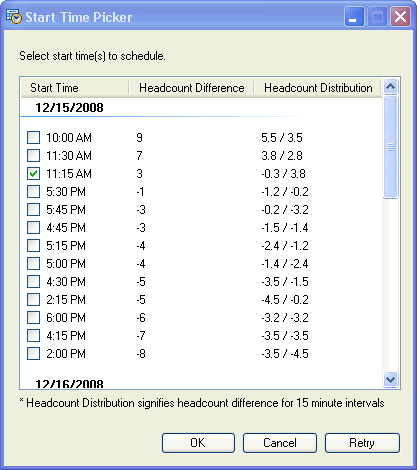
The following information is displayed:
Start Time: This is the suggested group activity start time.
Headcount Difference: This is the difference between the forecast number of people and the scheduled number of people after scheduling the group activity.
For example, you are trying to schedule 4 people for a meeting from 2:00 pm - 2:30 pm. There are 9 people forecast, and 12 people scheduled for the 2:00 pm - 2:15 pm time slot. If the 4 people were to attend this meeting, that would leave 8 people working of the 12 people scheduled. Since 9 people were forecast and 8 are actually working, the headcount difference is -1 for this 15 minute time slot.
Continue calculating the difference for the 2:15 pm - 2:30 pm time slot (the next 15 minute interval). For this time slot, there are 11 people forecast, and 13 people scheduled. If the 4 people were to attend the meeting, that would leave 9 people working of the 13 people scheduled. Since 11 people were forecast and 9 are actually working, the headcount difference is -2 for this 15 minute time slot. Factoring the headcount difference for both 15 minute time slots (30 minutes for the group activity), the aggregate of the difference is -1 plus -2, so -3.
Headcount Distribution: This is the headcount difference for each 15 minute interval that is included in the 30 minute activity. Using the same example above, the distribution is listed as -1.0 / -2.0.
In the Start Time Picker dialog box, select the best possible time for the group activity. Multiple times can be selected to schedule multiple activities. Click OK to save the activity. Click Retry to return to the Schedule Activity dialog box and start over.
Note: The system calculates data every 15 minutes, providing the difference per every 15 minutes and the aggregate value of the difference for the total time period of the activity. This aggregate provides helpful scheduling information at-a-glance.
Tip: The Headcount Difference that is closer to 0 (or a more positive number), is the best time to schedule an activity.