|
Date |
Changes |
|
11-November-2011 |
Interaction Center 4.0 GA
The Win32 edition of Interaction Supervisor has reached the
end of its product lifecycle, and is no longer supported in IC
4.0. It is replaced by a new Interaction Supervisor that was completely
rewritten to run inside IC Business Manager. In a nutshell, the
major changes are:
Interaction Supervisor takes advantage of multiple workspaces
in IC Business Manager, to mix Supervisor views in one application
with Interaction Recorder, Interaction Feedback, Interaction Optimizer,
and other modules.
Interaction Supervisor's user interface was modernized, and
important new features were added.
A new License Statistics view indicates how
many concurrent licenses are in use, so that administrators can
be alerted when license availability drops below user-defined
thresholds. Other views have been enhanced to filter by interaction
type, or to drill down selected statistics.
Assistance Response features allow Supervisor users to
chat with an agent while listening to a call.
Interaction Analyzer columns in queue controls
display keywords spotted in real-time along with call scores for
the agent and customer, so that the Supervisor user better knows
when to listen, coach, or record questionable calls.
APIs were added for statistics, alerts, and other supervisory
features, making it easier for IC subsystems to provide real-time
statistics and alert notifications. Alerts can be shared among
multiple users.
Support for Session Manager was added, so that supervisor users
can view session counts for IC applications.
Supervisor uses less bandwidth than before. It is more scalable,
since it makes effective use of IceLib and Session Manager. For
example, there is no increased load when multiple users subscribe
to the same alert.
Interaction Supervisor was completely rewritten in .NET.
The IC Business Manager framework offers many advantages to
Supervisor users. Users can, for example, create a custom workspace
that displays Supervisor views alongside data from other IC Business
Manager applications. Interaction Supervisor inherits all features
of the framework, including its consistent user interface, advanced
window docking, and common controls.
The notion of mixing Supervisor views is so inherent and useful;
Interaction Supervisor doesn't have its own application icon in
IC Business Manager. User's don't switch to Supervisor.
They simply add Supervisor views to the workspace they are in,
mixing views any way they like. Views are added by choosing New
> View from the File menu—see
Manage Views for details.
The availability of views is controlled by IC server license
and assignment of user rights. When a user logs in to IC Business
Manager, it loads all views for which that user has rights. Users
see only those views that they are authorized to use. Within views,
other restrictions can apply. A user can be permitted to view
a subset of workgroups, for example.
The visual controls that display information in Interaction
Supervisor were enhanced to put more information in each view,
and to ease configuration of alerts. For example, a new statistic
control displays metrics and alerts together. Alert icons appear
next to statistic values, even in graph views. Statistics are
grouped in expandable panels (called expanders) that
allow sections of a view to be hidden or displayed at will. Queue
controls were rewritten to make selection of parameters easier.
The result is an overall user interface that is more powerful,
more elegant, and consistent in all respects.
In this edition of Interaction Supervisor, interaction counts
for Queue Statistics always include all interaction types, regardless
of the filter selection. Counts apply to all connected interactions,
except alerting interactions, disconnected interactions, and SIP
Connection calls.
Interaction Supervisor's online help was rewritten to document
all views in a single help file. The organization of help topics
mirrors the categorization of views in Interaction Supervisor.
This makes the help more intuitive to use than before.
You can look up the description of each statistic directly in
Supervisor, and display it in a pop-up, by holding the mouse pointer
over a statistic. It is no longer necessary to open help files
to view this information. Help text is built-in for every metric.
Additionally, descriptions are summarized in the online help and
printable PDF version of the help, for persons who want to read
a categorized explanation of statistics without interacting with
the application.
A Help menu in IC Business Manager offers user assistance for
every application module, including help for Interaction Supervisor.
You can open help for any application that runs in IC Business
Manager, such as Interaction Optimizer, Interaction Feedback,
Interaction Recorder, Process Monitor, and Interaction Reporter,
for example. New help selections will appear in this menu as future
applications are added to IC Business Manager.
Interaction Supervisor in IC 4.0 is a careful, deliberate redesign
of the original Win32 application. Supervisor retains its former
functionality, recast with new features that optimize performance,
scalability, and ease of use. The enhancements are too extensive
to list individually in this topic, but they are addressed throughout
the online help.
Persons familiar with the Win32 edition of Supervisor will be
productive immediately with this version. Persons using Supervisor
for the first time will master its many features with a minimal
learning curve, particularly if they have used other IC Business
Manager applications in the past. |
|
18-April-2012 |
Interaction Center 4.0 SU1
-
A Details column was added to queue
views to display context-specific information based on the
interaction type. For example, a call interaction might display
To: Interactive Intelligence. This column
displays context-specific information based on the interaction
type. For calls, it shows the Remote Address (phone number).
For callbacks, it shows the subject of the callback. For emails,
it shows the email subject. For chats, it shows the name of
the user who last typed, and the text they entered. (IC-69807,
IC-70036, IC-83793).
-
Added two email columns to Supervisor queue views: Importance
and Attachments. The importance column shows
an icon indicating whether an email is high or low importance,
and is blank for normal importance. The Attachments
column shows an icon indicating that an attachment exists
on an email interaction, or blank if no attachments exist
(IC-83800).
-
Added a Chat Response Time column to queue views. This
column shows a counter that shows how much time has elapsed
since the last time the chat had text entered into it by anybody
involved in the chat. See Queue
Columns (IC-83796).
|
|
06-September-2012 |
Interaction Center 4.0 SU 2
-
Resolved an issue that could cause IC Business Manager
to crash if a user had a Workgroup Details, System Queue or
a Workgroup/Agent view opened in Supervisor, then closed IC
Business Manager and removed all rights to the Supervisor
account, IC Business Manager could crash while reloading and
trying to restart the watch on those workgroups (IC-98919).
-
Users can now disconnect multiple calls at once. To
use this feature, select calls in a workgroup queue. Right-click
to display a context menu. Then select the Disconnect
command. In previous releases only the first selected call
was disconnected (IC-85306).
-
Fixed a bug that prevented generic object interactions
from appearing in Interaction Detail Viewer (IC-93717).
-
Fixed a bug that prevented the Queue and Alert segments
from appearing in the Interaction
Details dialog, when the details of a Generic object interaction
were viewed (IC-83821).
-
Views in IC Business Manager and IC Server Manager can
be pulled into separate floating windows. Clicking a view
in Interaction Center Business Manager or Interaction Center
Server Manager and dragging it out of the main window will
create a new floating window that contains that view. Other
views can be docked within the floating windows in the same
manner as in the main window. Views can be positioned anywhere
on the screen and are not constrained to the application window.
You can click and drag any tab off of the application so that
it becomes its own separate window and remains on top of the
main window. If you close or minimize IC Business Manager
or IC Server Manager, the floating window will automatically
close or minimize (IC-95619).
-
Updated the topic titled Supervisor Related Licenses
to note a license name change. The name of the license required
to use Report Assistant changed from Interaction Report
Assistant Supervisor Plug-In to Interaction Supervisor
Plug-In: Reporting Assistant (IC-96065).
-
In previous releases, some statistic lists could not
be sorted by clicking on column headings. For example, users
could not sort the Session Managers view or an Agent Overview
by clicking on column headings. These views now have sorting
capability. Sorting occurs when a column header is clicked.
The sort order is not updated when statistic values change,
to avoid jumping of rows (IC-68593).
-
In the Workgroup Statistics view, a tooltip is now displayed
on the header of every row in the histograms. In earlier releases,
users had to request help in the histogram sub view to see
the values of the different time intervals per interaction
type (IC-92889).
-
New menu options offer commands associated with the
active view. For example, a Workgroup Details
menu is available on the Supervisor Workgroup Directory view
and the Supervisor Workgroup Details view. This menu contains
a Directory formatting options option that
opens the Workgroup Directory Options dialog (IC-84549, IC-77247,
and IC-77249).
Two options on the Workgroup
Directory Options dialog were renamed:
Show agents who are available to take ACD calls in
was renamed to Text color for agents who are in an ACD
available status, logged-in, activated, and off the phone .
Show On Phone agents in was renamed to Text color
for agents who are on the phone .
-
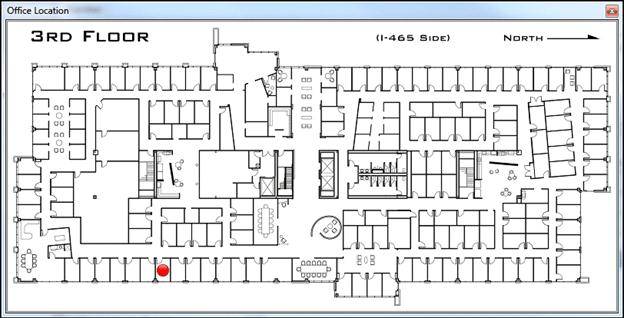
Several Supervisor views can look up an employee's photo
and office location. The graphic displayed for Office Location
can be anything your IC administrator draws to indicate a
locale. In most cases an office floor plan is displayed. See
Look
up an employee photo and office location for details (IC-91991).
-
Fixed an exception in IC Business Manager caused by
leaving an Interaction Detail report view open and exiting
IC Business Manager. Please note that any reports that are
left open when IC Business Manager is closed will not be restored.
Reports can take significant time to execute, so they are
not automatically restored when a ICBM is started (IC-91464).
-
Users can now drill down into longest interactions statistics
in System Status views to view the interactions responsible
for the longest interaction statistic (IC-85591). To support
this feature a tab was added to the Interaction
Properties dialog that shows all attributes to which the
user has rights (IC-87900). The drill down feature not only
works for the 'Longest' statistics, but for all statistics
that have one or more interactions as drill down information.

-
The License Statistics
view now offers a selection control that displays only
concurrent or assigned licenses. By displaying one license
type at a time, the number of statistic watches can be reduced
by approximately fifty percent, which decreases overhead significantly.
In previously releases it was possible to view concurrently
licenses only (IC-78286).
-
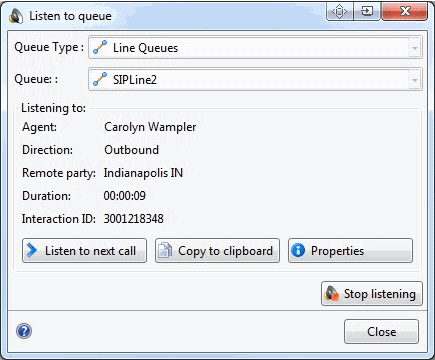
A new Listen to Queue feature provides
the means to continuously listen to a line, station, user
or workgroup queue. When you begin listening, Supervisor initiates
a queue watch that automatically picks up the next longest
call in the queue. See Using
the Listen to Queue feature (IC-75213, IC-76709).
-
Additional queue columns
were added to support Interaction Process Automation (IC-76709).
The following columns are now available in Supervisor queue
views:
Process ID
Work Item Created On
Work Item Error
Associated Process
-
Another queue column, Time in Workgroup Queue
was added to display the amount of time an interaction has
been in a workgroup queue (IC-77312).
-
IC Business Manager now honors licensing restrictions
immediately when changed. If a user's license is revoked,
all associated views close automatically. In previous releases
an IC Business Manager restart was required to accommodate
license changes (IC-84837).
|
|
28-February-2013 |
Interaction Center 4.0 SU 3
-
Added statistics for interactions held in workgroup
queues. The new statistics are:
Longest Hold Time
Interactions Held
Interactions On Hold
Average Hold Time
Total Hold Time
-
Added a workgroup statistic titled Logged in + Activated
to show logged in agents, excluding deactivated users.
-
Added topics for Interaction Dialer views. Interaction
Dialer is a client/server extension that adds automated dialing
and campaign management features to CIC servers. Interaction
Dialer conducts campaigns by contacting a list of people according
to a prescribed list of rules. Interaction Dialer places outbound
telephone calls for campaigns, plays .wav files to answering
machines, sends faxes to fax machines, and routes calls answered
by a live person to an Interaction Attendant profile or directly
to Dialer agents. For information about Dialer views, see
Interaction Dialer
category and Dialer Statistics.
-
In previous releases, when an alert was configured to
play a sound when
the statistic value changes within the condition, the
sound played once instead of playing continuously while the
value was in range. This now works correctly for all statistics.
Time interval statistics that tick (duration, future
duration, finite duration, and time duration) play the alert
sound every second. Statistics that do not tick play
the alert sound every time the statistic value changes.
-
The Queues and Agent or Workgroup
Queue views now display the user's display name instead
of the user name. This makes it easier to identify the person
because user names often do not correspond with a person's
actual name.
-
In a Workgroup Details view, the Display Keyword
Analyzer information context menu option is disabled
until Interaction Analyzer keywords have actually been recognized.
In previous releases this option was always enabled.
-
Double right-clicking a view or dialog can no longer
invoke any action other than a shortcut menu. Previously,
some dialogs and views captured the double click of any mouse
button instead of the left button exclusively.
-
The Real Time Adherence view will automatically close
if access to an Interaction Optimizer scheduling unit is removed.
See Required ACL Right in the topic titled Interaction
Optimizer category.
-
ACL changes that affect the list of available queue
columns in the Queue
Columns Selection dialog are now applied dynamically to
the list. It is no longer necessary to close and reopen views
that use queue controls to
pick up ACL changes that affect column selection.
-
Corrected a defect that made it accidentally possible
to clear the contents of a Workgroup filter field, merely
by moving the mouse away from the drop down list. Workgroup
filtering is available in Workgroup Details, Workgroup Directory,
and Workgroup Statistics views. It is no longer possible to
accidentally clear the field.
-
Interaction Supervisor no longer terminates with an
unhandled exception if a user who does not have a System
Status license attempts to edit an alert. An error message
is displayed instead. The alert message reads: The statistic
definition for [statistic name] is blank. The appropriate
license to view this content might be unavailable . The
application framework hosting Supervisor no longer crashes
when this situation occurs.
-
The StatServer sub-system (StatServerU.exe)
was split into two binaries: StatServerAgent[U|UD].exe
handles agent related statistics. StatServerWorkgroup[U|UD].exe
handles workgroup related statistics. The split enhances processing
power and allows for statistics gathering in larger environments
with higher call rates. This enhancement did not affect Supervisor
in terms of usability or user interface.
-
Documented the control used to display information about
workgroup members in a new topic titled Workgroup
Directory control.
-
Supervisors can now view the skills associated with
each workgroup member in a new Skills column. The Skills column
displays skills owned by each user and his or her workgroup
skills. The Skills column makes it easy to identify persons
who have a specific skill. Supervisors can use this feature
to identify the most capable agent to handle a waiting interaction.
In the event that an interaction is waiting in queue because
of a lack of available skills, the supervisor monitoring a
workgroup queue can:
Find any agent with Skill X, activate, or contact them to
handle an interaction waiting in queue.
Find any agent with Skill X and identify what their proficiency
and desire to use are. This will help determine why interactions
are not being routed to them and/or if they are a good fit
for the waiting interaction.
The term skills refers to all skills that an
agent has assigned to him. These skills can be inherited or
be assigned directly to him. See Workgroup
Directory control for details.
-
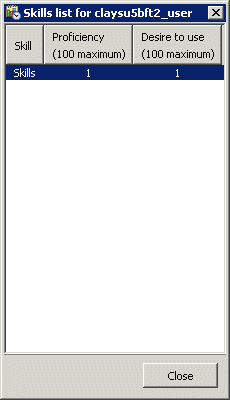
It is now possible to display a workgroup member's skills,
desire to use, and proficiency. See Skills
List dialog.
-
Added a Call Activity
view to the System Status category of
views. The purpose of the Call Activity view is to provide
an aggregate view of all calls going through IC. This view
displays activity in all line or station queues that the user
has ACL rights to see.
-
Added two views for Interaction Director, the CIC application
that allows multi-site contact centers to become a single
virtual operation. Interaction Director communicates with
registered CIC server in real-time, to gather data that is
relevant to queues, users, workgroups, skills, and so on.
Director uses this data to make routing decisions. It balances
loads by intelligently routing multimedia interactions between
CIC servers. See Interaction
Director category for more information.
-
The Master Administrator role was previously
required in order for a Supervisor user to manage user activations.
Starting with CIC 4.0 SU3, users who have the Activate
Others and Activate Self permissions
can manage user activations. In Interaction Administrator,
these permissions are located at Access Control
> Workgroup Queue > Advanced
Access Details.
-
The Formatting Options command, which
opens the dialog used to format rows for a list of members
in a workgroup directory, is now available from a pull-down
menu. Previously, this command could only be invoked by right-clicking
a row in the Workgroup Directory view.
-
To better describe the Advanced expander
on Tracker's
Interaction Details dialog, information from the IC Data Dictionary
was reproduced in this document for convenience. See InteractionSummary
table.
|
|
27-November-2013 |
Interaction Center 4.0 SU4
-
Updated the topic titled Interaction
Analyzer Columns in Queue Controls to note that Supervisor
differentiates between unanalyzed interactions and analyzed
interactions with zero score, for Analyzer keyword score aggregate
statistics. No score indicates that the interaction
is not being analyzed and a score of 0 indicates that
the interaction is being analyzed but has not accumulated
a score at this time.
-
Updated Workgroup
Directory Options dialog to describe the difference between
how the Available to take ACD Interactions
statistic is calculated compared to the calculation which
colorizes agents' rows. The former takes utilization into
account while the latter does not.
-
Fixed a problem that incorrectly displayed a value of
zero for calls that went to a workgroup queue and abandoned.
The CallDetail.Call Duration Seconds statistic now works as
intended. The duration for the interaction is computed using
Interaction initiatedtime and Disconnected (terminated) time.
The duration is the time difference between the interaction's
initiation time and terminated time.
-
Supervisor now indicates which channels have keyword
spotting. Previously users had no way to distinguish between
a call that has no keyword spotting and a call that has keyword
spotting which hasn't spotted any keywords.
Since keyword spotting may not be enabled for all calls
in a particular queue, Supervisor queues now display a column
which indicates whether keyword spotting is enabled on the
customer channel, agent channel, or both channels.
-
Corrected a bug which caused Supervisor to display conference
call parties incorrectly. Previously, when one party of a
conference disconnected, the Station Queues Call Activity
View removed the entire conference from the list of interactions.
Since other parties are still in an active call, they are
now displayed as intended.
-
In the Workgroup Detail View, the user queue column
has been changed to display nothing when an interaction has
not been assigned to an agent. The Name column
no longer displays To: or From:
for interactions that are part of a conference.
-
The Manage Alert dialog now loads alert sets faster.
-
Fixed an issue which could cause the Workgroup Details
view to appear blank when reopening IC Business Manager if
the selected workgroup is not in the first unfiltered 20 workgroups
returned by the server.
-
Modified several views to correct a display problem
that could occur when columns are resized. Previously, it
was possible to make columns so narrow that statistic values
disappeared. The views now enforce minimum column widths.
-
Filtering of skills in a Workgroup Directory view now
works differently. Filtering previously performed a substring
search starting at the beginning of the target text. For example,
ac would find acceptance but not inner
peace . Filtering now selects substrings anywhere within
the target text. As a result, ac will now find
inner peace .
-
Supervisor no longer displays Agent/Customer score columns
to users who have insufficient access rights. Specifically,
the Keyword Analyzer dialog, accessible from the 'Agent Score'
and 'Customer Score' columns in queue views, now shows Agent
and/or Customer information based on the user rights. This
is also discussed in Interaction Analyzer Technical
Reference. See the topics titled View Interaction
Analyzer current workgroup queue and Enable display
of Interaction Analyzer columns for a user .
|
|
27-March-2014 |
Interaction Center 4.0 SU5
-
A change was made to modify the way intercom calls are
logged in Tracker Server. Previously Tracker server duplicated
the segment data it received on initiator Call ID on to respondent
Call ID. This created challenges in collecting segment data
specific to either the initiator or the respondent party's
Call ID.
Tracker server was modified to track segment data for both
Call ID's independently of one another. This improved the
segment data collection for intercom call scenarios such as
simple two party calls, blind transfer and consult transfers.
-
In addition, a new feature was added for blind transfer
scenarios. Customers need a way to tell which party did the
transfer, what was the Call ID, which party and Call ID was
transferred and similar details.
Tracker server now includes these transfer details in the
pre-Transfer segment in Detail Viewer under the Advanced->Details
key. Information is be stored in the Interaction segment details
table so that customers can query these details if needed.
-
Similarly, external to external blind transfer now has
this information in a pre-transfer segment and also has an
extra 'external transfer segment' that displays details like
'the other Interaction ID'; the new Call ID created when inbound
external call is transferred to another external party' and
'Remote Number transferred to'. This information is stored
in Interaction Segment details table and can be queried from
there as well.
-
Interaction Supervisor now displays a tooltip if it
is unable to receive a statistic update, such as when a server
is too busy. The tooltip summarizes the error condition. The
possible error conditions include:
The statistic key is malformed.
The statistic key could not be recognized.
The statistic provider is currently too busy to process
the request.
An unknown error occurred.
-
Revised the Manage
Workgroup Activations and Manage
User Activations topics. The commands for opening these
dialogs were removed from the Tools menu and are now available
from context menus. Manage User Activation is available from
a context menu when right clicking on a user in a directory.
Manage Workgroup Activation is available via the right click
menu on a user in a directory and is also under the Workgroup
Directory and Workgroup Details menus.
-
A new topic, Copying
Tracker information to the Clipboard explains how to copy
Tracker information from an Interaction Details view to the
clipboard, for pasting into other applications.
-
Labels on the Play a sound on Alert
dialog were revised for clarity. Plays a sound when the
statistic value changes within the condition was changed
to Play a sound while alert condition is within range .
-
Corrected a problem that caused Interaction Detail Viewer
to display a transfer icon adjacent to the Interaction Id
doing the transfer instead of next to the Interaction Id being
transferred. This issue affected call scenarios that involved
an intercom party doing the transfer, such as an intercom
call transferred to external party or an intercom call transferred
to another intercom party (or IC user).
-
Previously, for some languages, the IC Business Manager
Chart options dialog, Title tab, font drop down box did not
list fonts installed on the system. The font selection combo
box now displays the entire list of fonts available in the
system.
-
Previously, when changing the Queue columns ACL on the
server, the list of available columns in the queue view was
not updated until the queue view was closed and reopened.
ACL access to queue columns is now updated while the queue
view is open. It is no longer necessary to close and reopen
the view.
-
A new Skills column is available in
views that contain a directory control, such as the Workgroup
Directory view. The Skills column displays skills associated
with each agent. Multiple skills are delimited by commas.
Skills belonging to the user's workgroups appear first, followed
by the skills of the user. If sorting by skills, standard
alphabetical order on the entire content of the skill field
is used.
|
A right click context menu item (Display
Skill Set) displays the entire list of skills,
their proficiency and the desire to use them. If a
user has the same skill in two different workgroups
with different proficiency and desire to use, they
will both appear in the user skills dialog box.
Filter capability is provided. If you type a filter
string at the top of the column, only the agents with
the filtered skill will appear. The filter is case
independent. When the directory is paged, the filtering
is done by the server, otherwise it is done locally.
Skills display is dynamic in the contact directory
list and static in the user list skills dialog box. |
-
Updated the topic titled Manage
Alerts dialog. The Show all alerts in the system
check box is now only available when the user is configured
as a master administrator in Interaction Administrator.
-
As a best practice, the recommended size of user photos
is 128 x 128 pixels. Starting with CIC 4.0 SU5, larger user
photos will be scaled to 128 x 128. User location images will
be scaled to fit within the bounds of the active monitor's
working space.
-
In the License Statistics view, the
Concurrent License column was renamed to
License. This reduced overhead by alleviating
the need to rename the column heading dynamically when the
License type field is used to display assigned
or concurrent licenses.
-
A menu option named Second sort column
was added to the statistic drill down menu in Session
Manager views, to allow the user to select a secondary
sort column and a secondary sort direction.

-
The Workgroup Selection dialog was
eliminated from Interaction Supervisor. This wizard for selecting
a workgroup is no longer needed since views now default to
the first workgroup listed. Users can optionally change the
workgroup by selecting or filtering a workgroup.
-
Interaction Supervisor grays out statistics that do
not apply to a real time skills filter. Statistics that are
unaffected by the skill filter are still shown but the label
text is grayed out, the value border is inactive and all other
controls are hidden.
-
Noted in Workgroup
Details and Workgroup
Statistics topics that skills filtering may be hidden
in order for Supervisor to remain backwardly compatible with
older versions of IC.
-
Filter text boxes now appear above workgroup columns
in some views. A limited number of workgroup rows are displayed
by default. To list specific workgroup entries, users should
type in the filter box all or part of workgroup names they
wish to match.
-
Interaction Supervisor is now available in Interaction
Desktop, in addition to IC Business Manager.
|
|
04-November-2014 |
CIC 2015 R1
Updated documentation to reflect changes required in the transition
from version 4.0 SU# to CIC 2015 R1, such as updates to product
version numbers, system requirements, installation procedures,
references to Interactive Intelligence Product Information site
URLs, and copyright and trademark information. |
|
10-February-2015 |
CIC 2015 R2
Several improvements were made to the Interaction
Details dialog.
-
New Previous/Next buttons which enable
you to navigate to the previous and next interaction records
found in the Interaction Details view search results.
-
The Recording indicator now includes
a control that enables you to playback interaction records.
-
A Secure Input icon can appear which
indicates how many time the agent transferred the interaction
to the IVR for secured input from the caller.
|
|
05-May-2015 |
CIC 2015 R3
Updated the Copyright and Trademark Information.
Updated documentation to reflect the addition of two CIC client
applications, Interaction Desktop and Interaction Connect. |
|
09-February-2016 |
CIC 2016 R2
Added the ability to Manage
Workgroup Membership from IC Business Manager.
You can now restrict the number of records that appear in the
IC Business Manager Statistics view by configuring server parameters
in Interaction Administrator. For more information, see the Interaction
Administrator help. |
|
03-May-2016 |
CIC 2016 R3
Added the ability to create snippet
recordings from Supervisor views. |
|
09-August-2016 |
CIC 2016 R4
Renamed Unlicensed recordings (today) statistic to Encumbered
recordings (today) and renamed Unlicensed recording (last hour)
statistic to Encumbered recordings (last hour). |
|
01-November-2016 |
CIC 2017 R1
Added Content Servers view, Interaction Recorder category, Content
Servers Statistics, and added new statistics to PMQ statistics.
Updated descriptions of cumulative and partial sum in Workgroup
Details view and Workgroup Statistics view.
Updated PMQ statistics topic. |
|
07-February-2017 |
CIC 2017 R2
Updated descriptions for Longest Talk Time and Longest Inbound
ACD Interaction statistics. |
|
02-May-2017 |
CIC 2017 R3
Added Force User Logouts subtopic under Workgroup Details view.
Added Force User logout security right. |
|
08-August-2017 |
CIC 2017 R4
Updated Workgroup Statistics and Queue statistics topics.
Removed references to Interaction Client .NET Edition and Interaction
Client Web Edition. |
|
31-October-2017 |
CIC 2018 R1
Rebranding content of Supervisor help.
Added note to Force User Logouts topic to clarify the feature
is available in 2017 R3 and later. |
|
20-February-2018 |
CIC 2018 R2
Updated Execute a custom handler on alert dialog topic. |
|
21-August-2018 |
CIC 2018 R4
Updated Interaction Details view to include Social Conversation
as a Media Type. Updated Interaction Details dialog to include
Social conversation icon. Updated Interaction Statistics to include
Longest social conversation and Active social conversation statistics. |
|
28-February-2019 |
Created this change log. |
|
19-March-2019 |
Updated description of Agents available statistic in WorkGroup
Statistics topic. |
|
02-May-2019 |
Updated Total TTS sessions and Available TTS sessions statistics
in IC System Status topic. |
|
03-June-2019 |
Updated Manage User Activations topic and Manage Workgroup
Activations topic to note Supervisor tracks user activations only
for ACD and Custom Queue type workgroups. |
|
07-June-2019 |
Updated Agent Statistics, Workgroup Statistics, and Queue
Statistics to include these new statistics: Customer Keyword Spotted,
Agent Keyword Spotted, Total Agent Positive Score, Total Agent
Negative Score, Total Customer Positive Score, Total Customer
Negative Score, Highest Active Agent Positive Score, Highest Active
Customer Positive Score. |
|
28-June-2019 |
Updated Workgroup Details view and the Workgroup Directory
view to include the Skill Set (Proficiency) column and the Skill
Set (Desire to use) column. |
|
17-September-2019 |
Removed Current Period statistics topic that contained incomplete
information that wasn't required |
|
22-January-2020 |
Updated "Licenses, Security and Access Control Rights"
topic to replace license.inin.com with link to "Activation
File Management Tool" in Licensing TR. |
|
19-March-2020 |
Updated "Workgroup statistics" topic to clarify
number of logged on agents. |
|
23-June-2020 |
Updated "Call Action Control ", "Workgroup
Details view", and "Using the Listen to Queue Feature"
topic to clarify user must be logged in to station. |
|
03-December-2020 |
Updated "Assistance Request time out to 10 seconds". |


