


- Contents
PureConnect Release Notes
Interaction Connect Statistics Views
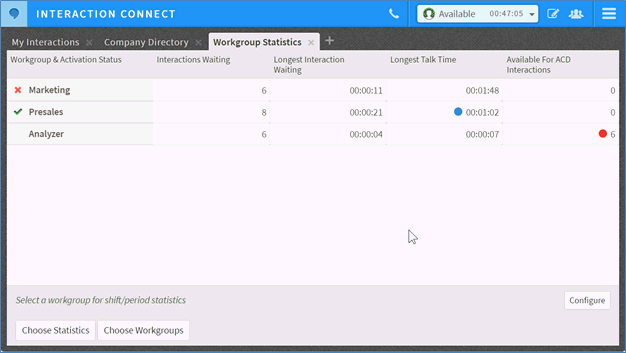
Workgroup Statistics
The customizable Workgroup Statistics view displays a table for viewing selected workgroup statistics by workgroup. Users can select multiple workgroups and view up to eight statistics per workgroup. Users can view shift and period statistics to compare their own performance to the workgroup. Users with the Interaction Supervisor Plugin: Workgroups license can choose which statistics appear in the table and can enable alerts for the statistics in the view.
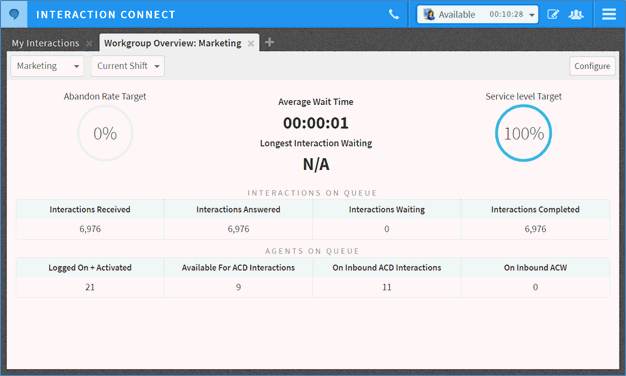
Workgroup Overview
The new Workgroup Overview view is a customizable summary of a workgroup’s performance during a shift or period. The view includes graphical elements for service level, abandon rate, and wait time statistics, and includes more detailed statistic values for interactions and agents on queue. Users with the Interaction Supervisor Plugin: Workgroups license can choose which statistics appear in the table and can enable alerts for the statistics in the view.
Agent Overview
The Agent Overview view enables supervisors to manage their agents. The customizable view offers a snapshot of a single user in a selected workgroup, showing user status, workgroup activation status, and selected agent-specific statistics. The view also includes a queue of the interactions assigned to the agent with supervisor-focused call control actions, including coach, listen, and join. This view is only available to users with the Interaction Supervisor Plugin: Workgroups license.
