


- Contents
Dial Plan Technical Reference
Dial groups
To specify a dial group, click Add Group on the Dial
Plan page. Here, you can specify one or more dial groups to use to place
the call, an alternate dial string (optional) and an alternate classification
(optional). The list of available dial groups appears after the CIC administrator
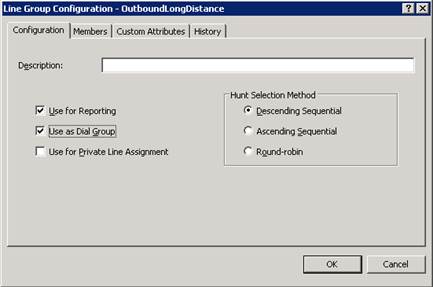
creates one or more Line Groups entries and selects the
Use as Dial Group check box on the Line Group
Configuration property page. A dial group is a group of lines
or channels that CIC uses for outbound calls. The lines included in this
group should have a direction of Outbound rather than
Inbound or Both to avoid line contention
when dialing. For more information, see the Line Configuration
topic in Interaction Administrator Help.
Click Add Group to specify one or more dial groups to use to dial the outbound call.
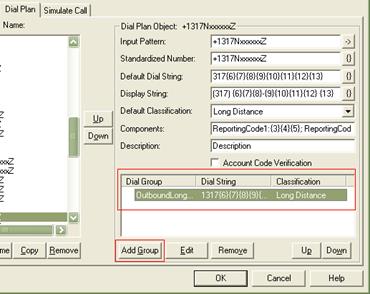
A Dial Plan object can include zero, one, or more dial groups. If you do
not specify a dial group at all for a Dial Plan object, CIC uses its own
default order for selecting available trunks and channels to dial outbound
calls (see the Line Selection Order
topic in Interaction
Administrator Help for details). If you specify one dial group
for a Dial Plan object, CIC attempts to use a line on that dial group
to dial the call. If no lines are available on that dial group, it uses
the default CIC line selection order. To help avoid using the default
line selection order, you can specify two or more dial groups for CIC
to use when dialing each number. CIC uses the dial group at the top of
the list first. If no lines are available in that group, it uses the next
dial group down the list until it finds an available line, or until it
ends up using the default line selection order. Since different line groups
may be trunks from different service providers, you may need to specify
an alternate dial string (for example, one that requires a different prefix)
for each dial group.
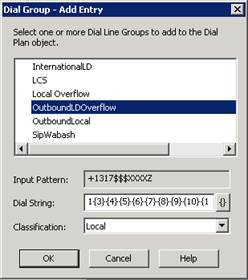
Line Group configuration controls which lines appear in the Dial Group
– Add Entry dialog on the Dial Plan page.
Dial groups enable you to specify which outbound lines or channels to use
for each type (classification) of phone number. For example, international
calls may be directed to one dial group that uses lines with the best
rate for international calls. Local calls may be directed to another dial
group called Local
over low-cost analog lines from the local CO.
If you do not specify a dial group for a Dial Plan entry, calls placed
via that Dial Plan object use the first available line with a direction
of Outbound or Both.
Note:
All of the lines or channels in a dial group must have identical dialing
requirements. In other words, you cannot have some lines that require
a 9 prefix and other lines that don’t within the same dial
group.