


- Contents
Interaction Director Concepts Technical Reference
Pre-Call Routing
Pre-call routing is the process of routing a call before the call connects to a location. In pre-call mode, Interaction Director receives a call event from a SIP network interface, usually a telecommunications carrier. Interaction Director analyzes statistical data collected from managed CIC servers, then "directs" the carrier to send the call to a specific destination point.
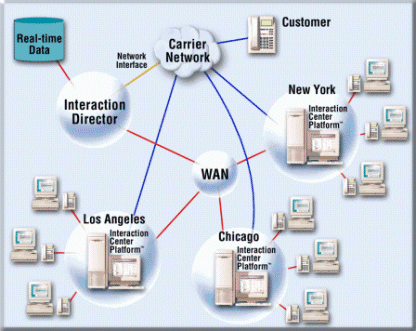
You can think of pre-call routing as "carrier-based routing" since routing decisions occur before the call connects and are based on signaling information from the carrier network.
A signaling link from a network carrier sends advance notifications of incoming calls to Director. It receives this information, views the current state of all call centers, and then sends a notification back to the PSTN indicating where to route the call. Thus, the call routes before answering it.
Pre-call routing can reduce toll charges, since Director makes intelligent routing decisions before the call connects, rather than using post-call routing to transfer the call after sending it to a call center site.
Pre-call routing process
Pre-call routing uses a carrier network protocol to examine calls in the PSTN before sending them to a specific site. In a pre-call routing configuration, the Director server connects to the carrier with an SIP interface and to the same LAN/WAN as the CIC servers to collect real-time CIC server queue statistics.
-
The carrier uses a carrier-provided protocol to send a message to Interaction Director. In Interaction Administrator, the Interfaces container manages the settings used to configure SIP protocols.
-
The message contains the ANI, DNIS, and another field that can contain information collected in an IVR session at the carrier level. Interaction Director can receive the dialed number, the caller's number, and CED (customer entered digits). These pieces of information are then available to the pre-call routing logic.
-
Director determines where to route the call based on scoring criteria and data collected in real time from the monitored servers on the network. Director can evaluate these factors:
-
-
ANI/DNIS
-
Network IVR info
-
Time of day, date
-
Current site loading
-
Current agent availability
-
Other logic and data available using Designer tools
-
-
Director sends a destination message to the carrier. This message tells the carrier where to route the call. The routing message contains:
-
-
A routing code (a disposition for the call that the routing table provisioned with the carrier configures).
-
Additional information in various forms (depending on the carrier) that can transmit with the call to the final destination.
-
Error or diagnostic codes that can assist the carrier when there is a problem.
-
You can configure Interaction Director with defaults that Director sends back to the carrier when it cannot determine where to route the call in a specified amount of time. This feature ensures that Interaction Director minimizes alerts to the carrier's network maintenance facilities. For example, if Director does not respond within 500 milliseconds, the carrier uses a predefined routing table to route the call.
Pre-call Director Server settings
You configure Monitored Servers, Enterprise Groups, and network interfaces on the stand-alone Director server, along with connections used to gather real-time statistics from monitored servers. When using post-call routing, they are also where an administrator specifies how to transfer calls, defines the cost of certain server-to-server connections, and specifies how to send call information.
After you establish Enterprise Groups for each phone number, Interaction Director uses the following statistics to determine how pre-call routing occurs. For each statistic, you can apply a weight and a positive or negative factor to specify how to route calls. Also, you can increase each time-based score using a time interval.
-
Average Wait Time
-
Average Wrap-Up Time
-
Logged-in Agent Skills
-
Longest Wait Time
-
Number of Active Lines
-
Number of Connected Calls
-
Number of Free Lines
-
Number of Logged-in Agents
-
Number of Waiting Calls
-
Number of Wrap-Up Agents
-
Queue Member Order