


- Contents
Interaction Media Streaming Server Technical Reference
Specify an External Audio Source for Queue Audio in a Group Transfer Operation
To specify an external audio source for queue audio in a group transfer operation
-
In Interaction Attendant, insert a Transfer to a Workgroup or a Station Group operation.
Note:
A valid Workgroup or Station Group must exist in Interaction Administer before you can select it in Interaction Attendant. For more information, see the Interaction Administrator documentation.
-
In the left pane of the Interaction Attendant window, click the Group Transfer object that you just inserted.
-
Right-click the Group Transfer object and select Insert > New Operation > Queue Operation > Play a Message to the caller from the resulting shortcut menu. The system inserts a Queue Audio object under the Group Transfer object in the left pane.
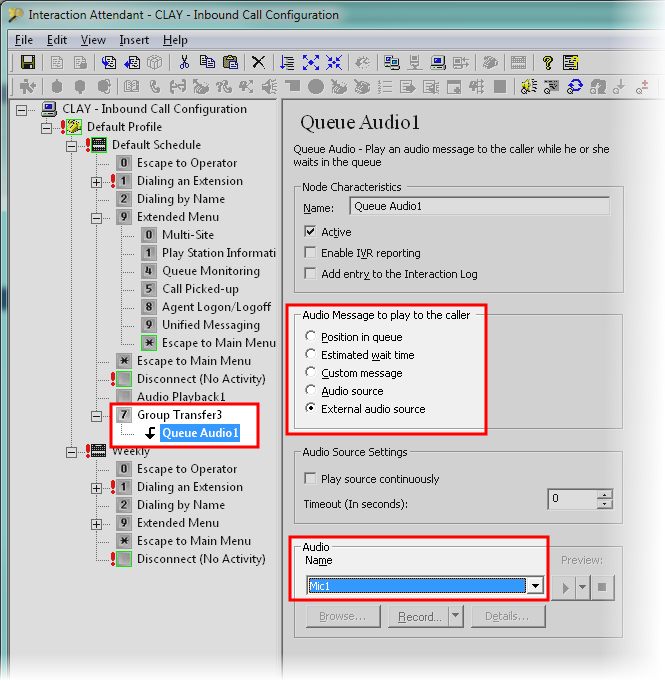
-
In the left pane, click the new Queue Audio object.
-
In the Audio Message to play to the caller group, click External audio source.
-
In the Audio group in the Name list box, click the external audio source.
-
From the menu bar, click File > Publish to save your changes to the CIC server.