


- Contents
Interaction Administrator Web Installation and Configuration Guide
Enable .NET Framework 4.6.2
Before you install the IIS and ASP.NET modules, enable Microsoft .NET Framework 4.6.2. You can do this either through the Windows Control Panel or at a command prompt.
To enable the .NET Framework 4.6.2 through the Windows Control Panel
-
Open Server Manager.
-
Click Add roles and features.
-
Click Installation Type. Click Role-based or feature-based installation and then click Next.
-
On the Server Selection dialog box, click Select a server from the server pool. In the Server Pool list, select your server and then click Next.
-
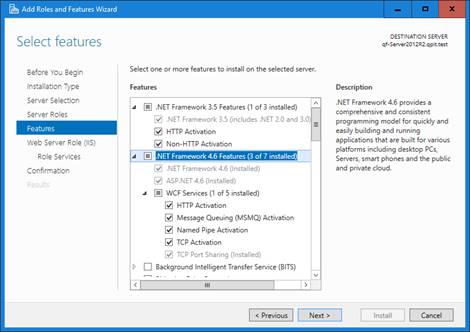
Click Features.
-
On the Features dialog box, select .NET Framework 3.5 Features. Expand the container and select all the options.
-
Select .NET Framework 4.6 Features. Expand the container and select all the options.
-
Click Next.
-
Proceed through the Add Roles and Features Wizard.
-
On the Confirmation dialog box, click Install.
-
When the wizard is complete, click Close.