


- Contents
CSV List Import Technical Reference
Create a SIP Station CSV list
To create a CSV SIP station list:
-
Open a copy of CSV SIP Station List.xls.
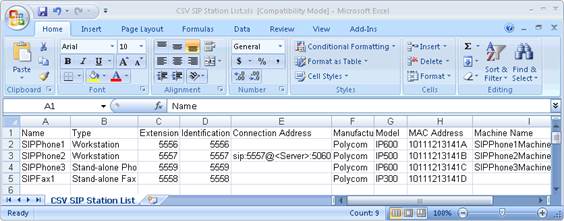
The following table provides descriptions of each attribute.
| Attribute | Description |
|---|---|
|
Name |
Type the station name (required). |
|
Type |
Workstation, phone or fax. |
|
Extension |
Type unique extension number for this SIP station |
|
Identification Address |
Type the identification address for this SIP station |
|
Connection Address |
Type the SIP address used to call this SIP station. |
|
Manufacturer |
Type the manufacturer of the phone for this SIP station. Possible values are: Polycom, Cisco, Generic, or free text entry. |
|
Model |
Type the specific type of phone model made by the phone manufacturer. |
|
MAC Address |
Type the MAC address of this phone. |
|
Machine Name |
Maps a machine to this station for licensing. |
-
Type the attributes in the appropriate columns for each SIP station to create.
-
Save the file as ".csv" file type on the CIC Server or another location.
-
If a message indicating that the ".csv" file cannot preserve some of the macros in the Excel file appears, click Yes. Add Stations Assistant doesn't need those macros when importing the file.
-
Download your SIP Stations CSV list to a secure location on the CIC Server.
When you open the CSV file in a text editor, the SIP Station information is separated by commas, with one station listed per line.