


- Contents
Latitude Help
Credit Card Type Codes
Use the Latitude Maintenance window to search for or delete credit card type codes. Use the Credit Card Type Properties dialog box to add or modify credit card type codes that your agency accepts for debtor payments. Credit cards are available for selection in the Work Form when entering a credit card payment. The algorithm for the credit card determines whether the system recognizes the credit card in the Arrangements wizard (version 8.0 and later).
To add or modify a credit card type code
-
In the Main Menu window, from the Maintenance menu, click System Codes and Settings. The Latitude Maintenance window appears.
-
In the Navigation pane, do one of the following:
-
To add a credit card type code, right-click the Credit Card Types folder and then click New Credit Card Type. The Credit Card Type Properties dialog box appears without any values.
-
To modify a credit card type code, right-click the credit card type code and then click Properties. The Credit Card Type Properties dialog box appears with the current values.
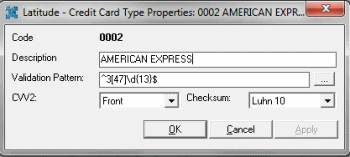
Description: Commonly used name for the credit card type.
Validation Pattern: Expression used to identify the card. To select this value, click the ellipsis (…) and then click a standard card type from the list.
CVV2: Location (none, back, front) of the security code on the card.
Checksum: Formula to use to validate the credit card.
-
Complete the information and then click OK.