


- Contents
Latitude Help
Search for an Account by Extra Data
Use the Simple Search tab in the Latitude Search - Search for Account window to search for an account based on content in the Extra Data fields that your agency configured.
To search for an account by extra data
-
In the Main Menu window, click Work or press Alt + W. The Work Form appears. The Work Form appears.
-
From the Search menu, click Search or press Ctrl + F. The Latitude Search - Search for Account window appears.
-
Click the Simple Search tab.
-
Click the
 icon at the end of the Extra Data box. The Select
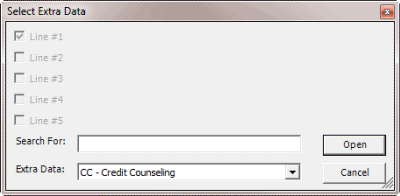
Extra Data dialog box appears.
icon at the end of the Extra Data box. The Select
Extra Data dialog box appears.
-
In the Extra Data list box, click the extra data item.
-
Select each check box that corresponds to the extra data field you want to search.
-
In the Search for box, type the text to locate and then click Open. The Select Extra Data dialog box closes and the number of selected Extra Data fields displays in the Extra Data box on the Simple Search tab.
-
Click Search. The results display on the Search Results tab. If the system doesn't find a match, it displays a message to that effect.