


- Contents
Latitude Help
Status Codes
Use the Latitude Maintenance window to search for or delete status codes. Use the Status Code Properties dialog box to add or modify status codes. Status codes are three-character codes used to indicate the state of an account and whether it is active or closed. You can change the status codes assigned to an account, based on your permissions. Latitude releases with several standard status codes. For more information, see Standard Status Codes.
Note: Certain Latitude system processes require specific status codes. See the standard status code list in the Work Form section for system-dependent codes.
To add or modify a status code
-
In the Main Menu window, from the Maintenance menu, click System Codes and Settings. The Latitude Maintenance window appears.
-
In the Navigation pane, do one of the following:
-
To add a status code, right-click the Status Code folder and then click New Status Code. The Status Code Properties dialog box appears without any values.
-
To modify a status code, right-click the status code and then click Properties. The Status Code Properties dialog box appears with the current values.
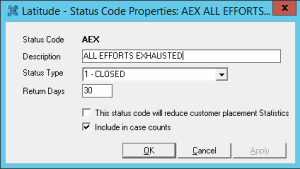
Status Code: Unique code that identifies the status.
Description: Description of the status code.
Status Type: The type of status. Valid values are:
Active: Latitude users can work accounts assigned an active status code. Text for accounts assigned an active status code appear in blue in the Work Form.
Closed: The system doesn't schedule accounts assigned a closed status code into a collector’s work queue. Text for accounts assigned a closed status code appear in red in the Work Form.
Return Days: Number of days to hold an account assigned to this status before returning the account to the customer.
This status code will reduce customer placement Statistics: If selected, the system subtracts accounts assigned to this status code from customer account placements (in Statistics Console).
Include in case counts: If selected, the Desk Mover tool counts accounts having this status against the Desk's case limit. The system includes accounts with this status in the Case Counts report.
Note: To configure credit bureau reporting options for a status code, use Credit Bureau Reporting Console. For more information, see the Credit Bureau Reporting Console documentation.
-
Complete the information and then click OK.