


- Contents
Latitude in the Cloud User's Guide
Close Your Citrix Receiver Session
To close your Citrix Receiver session, log off all open Latitude applications and then log off your Citrix Receiver session.
To close your Citrix Receiver session
-
Log off all open Latitude applications.
-
On the LATITUDE by Genesys page, in the menu bar, click your user name. A list of options appears.
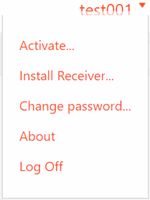
-
Click Log Off. If you logged on using a web browser, close the browser window.