


- Contents
Latitude in the Cloud User's Guide
Specify File Access Method
You can specify how to access files on your local computer during your current Citrix Receiver session.
To specify a file access method
-
In the notification area, right-click the Citrix Receiver icon
 . A menu appears.

-
Click Connection Center. The Citrix Receiver - Preferences window appears.
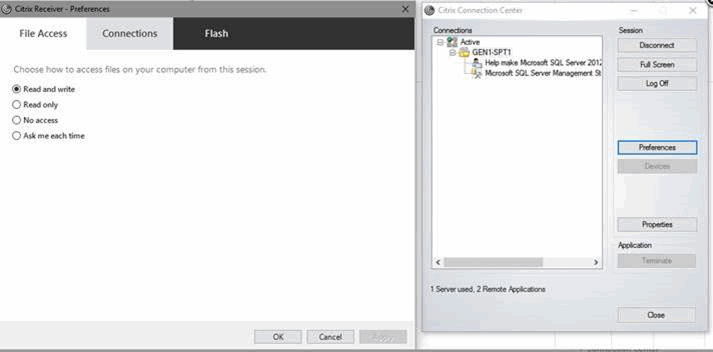
Read and write: If selected, you can read from and write to files on your local computer during this Citrix Receiver session.
Read only: If selected, you can only read from files on your local computer during this Citrix Receiver session.
No access: If selected, you cannot read from or write to files on your local computer during this Citrix Receiver session.
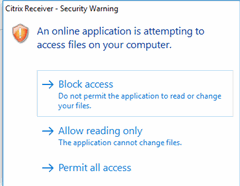
Ask me each time: If selected, Citrix Receiver asks you how to access files on your local computer each time you attempt to access the files during this Citrix Receiver session. When using this option, Citrix Receiver displays the following dialog box:
-
On the File Access tab in the Citrix Receiver - Preferences window, click an option and then click OK.