


- Contents
Tokenizer Configurator Help
Specify the Tokenizer Service Settings
Use the Settings section of the Secure CC Storage Configurator window to specify the settings for the Tokenizer service. Tokenizer stores the Tokenizer service settings in an XML file instead of the database.
To specify the Tokenizer service settings
-
Locate the Settings section of the Secure CC Storage Configurator window.
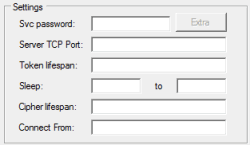
Srv password: Password that Tokenizer clients (like PVG) use to authenticate to the Tokenizer service.
Server TCP Port: Network TCP port on which the Tokenizer service listens. The default port is 840.
Token lifespan: Lifespan of a token, in days. The default is 100. If a Tokenizer client sets the lifespan (for example, in PVG's web.config file), the value in this box is ignored. Tokenizer deletes all tokens that aren't used within the specified lifespan.
Sleep: Start and end time to place the computer running Tokenizer in sleep mode. During the sleep period, the system doesn't run automatic housekeeping tasks.
Cipher lifespan: Number of days to use a cipher after it expires. The default is 7. Tokenizer re-encrypts tokens encrypted with an expired cipher.
Connect From: List of IP addresses (separated by a space) from which Tokenizer allows connections. For example, for PVG, list the IP addresses of all your PVG servers.
-
Complete the information and then continue to the next step in the checklist.