

- Contents
View Post-Dated Payments for an Account
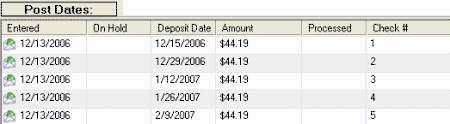
Use the Post Dates panel to view post-dated payments (PDC) for an account. Post-dated payments are scheduled future payments.
To view post-dated payments for an account
-
With an account displayed in the Work Form, do one of the following:
-
At the top of the Panels section, click the name of the currently displayed panel (for example, Notes, Phones) and then click Show Post Dates.
-
From the menu bar, click PDC.
The Post Dates panel appears.