


- Contents
Create a Micro Angular App
- Create a new project by running ng new CustomPanelTestApp
- Create a new component ng generate component CustomPanelTest
- Add HTML code that you want to see on the Anchor Panel. Refer to Micro Angular App Design Recommendations.
- Create a new service in Custom Panel folder. In that service, call the existing APIs. (GET, SAVE).
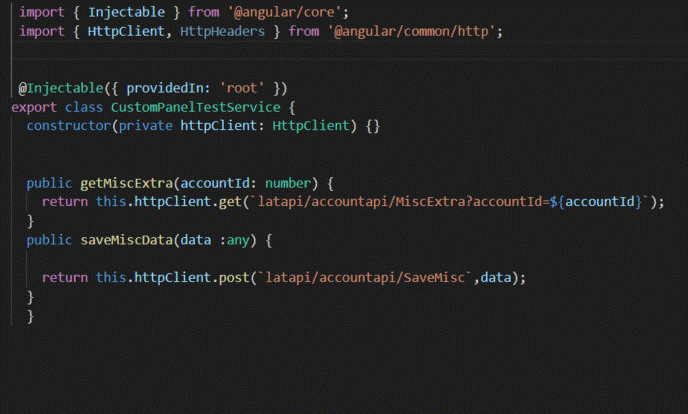
- Call the APIs in the component and verify if you are receiving the response or not.
- Create a new folder API-Interceptor and create a new service in that folder. In this service, write the code to change the URL and then send the authorization key values in the request header.

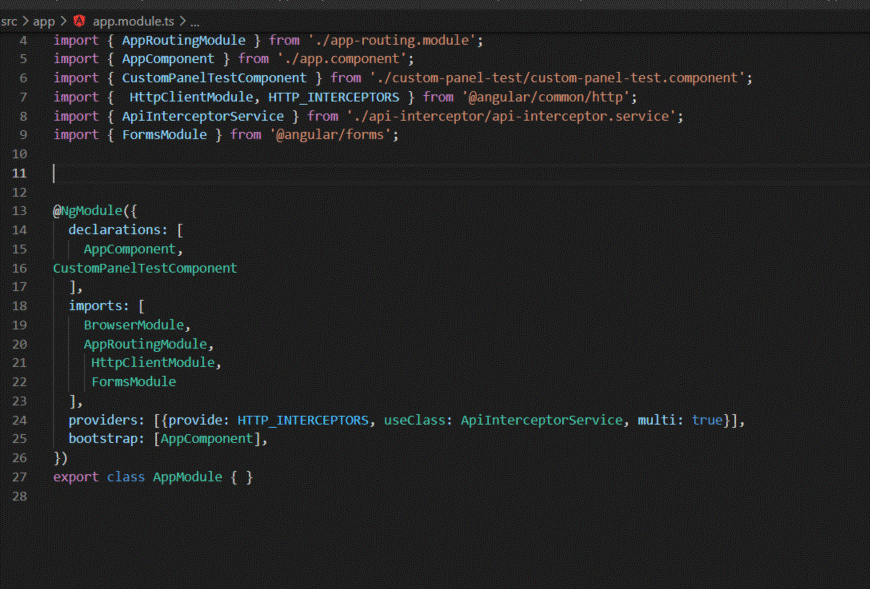
- Add reference of the interceptor service in the app.module. Also, add the reference for CustomPanelTestComponent.
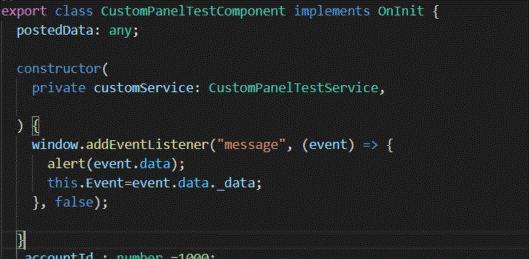
- Using the below code, you will be able to access/use the events triggered from the application, inside the custom anchor panel. This will receive the details of the events posted from the application.
- Now the MicroApp is ready.
- Run ng serve and verify if the Micro App is running properly.
- Run ng build --base-href /custom/custom Panel TestApp/. This will create a dist folder in the project.
- Inside dist folder, there will be a folder with the same name as project name.
- You can use this folder to deploy the Micro App in the server.