


- Contents
Reporting Console
Add a Custom Report Folder
Use the Navigation pane to add a custom report folder.
To add a custom report folder
-
Do one of the following:
-
To add a folder at the root level (same level as Custom Reports), in the menu bar, click Report and then click New Root Folder.
-
To add a folder within a folder, right-click the folder to add the folder to, and then click New Folder.
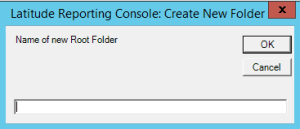
The Create New Folder dialog box appears.
-
In the box, type the folder name and then click OK. The system adds the folder to the Navigation pane.