


- Contents
Maintain General Legal Information
Use the General tab in the Legal View dialog box to maintain general legal information. Some information on this tab is available for use in merge letters.
To maintain general legal information
-
With an account displayed in the Work Form, from the Info menu, click Legal Case Info. The Legal View dialog box appears.
-
Click the General tab.
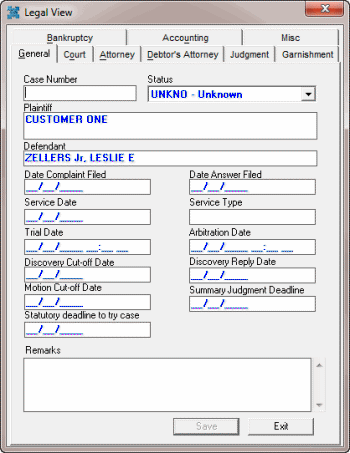
Case Number: Case number assigned to the legal case.
Status: Status of the legal case.
Plaintiff: Person who filed the complaint.
Defendant: Person the Plaintiff filed the complaint against. This box defaults to the primary debtor's name.
Date Complaint Filed: Date the Plaintiff filed the complaint with the court.
Date Answer Filed: Date the Defendant filed a response to the complaint with the court.
Service Date: Date the court served notice to the defendant.
Service Type: Type of service.
Trial Date: Date and time the court scheduled the trial.
Arbitration Date: Date and time the court scheduled arbitration.
Discovery Cut-off Date: Deadline for discovery requests.
Discovery Reply Date: Deadline for discovery responses.
Motion Cut-off Date: Deadline for filing a motion to reopen discovery.
Summary Judgment Deadline: Deadline for filing summary judgment motions.
Statutory Deadline to Try Case: Statutory deadline for trying the case.
Remarks: Comments regarding the case.
-
Complete the information and then click Save.