


- Contents
Maintain Legal Accounting Information
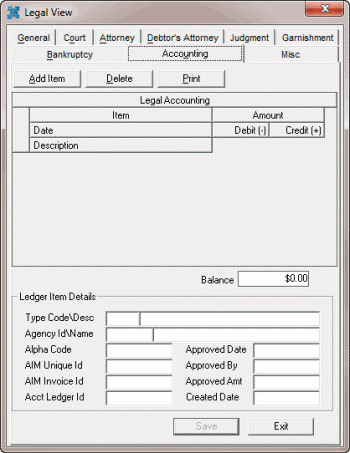
Use the Accounting tab in the Legal View dialog box to maintain legal accounting information. Some information on this tab is available for use in merge letters.
To maintain legal accounting information
-
With an account displayed in the Work Form, from the Info menu, click Legal Case Info. The Legal View dialog box appears.
-
Click the Accounting tab.
-
Click Add Item. The New Legal Ledger Entry dialog box appears.
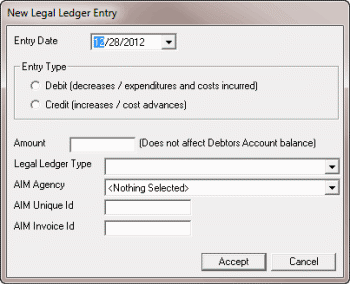
Entry Date: Date you added the entry to the accounting ledger.
Entry Type: Indicates if the ledger entry is a debit or credit.
Amount: Dollar amount of the debit or credit. This amount does not affect the debtor's account balance.
Legal Ledger Type: Ledger account to which to apply the debit or credit.
Note: If your agency uses AIM to forward accounts, complete the remaining boxes.
AIM Agency: Name of the outside collection agency or attorney who holds the account.
AIM Unique ID: Unique code that identifies the transaction in the outside collection agency's or attorney's system.
AIM Invoice ID: Code that identifies the invoice in the outside collection agency's or attorney's system.
-
Complete the information and then click Accept. The system closes the New Legal Ledger Entry dialog box and adds the information to the Accounting tab.
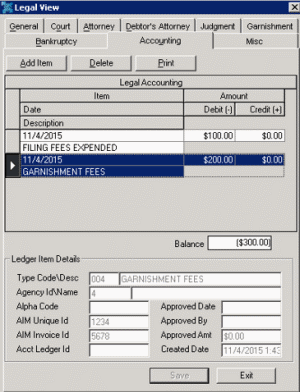
Item Date: Date your organization added the ledger item.
Item Description: Description of the ledger item.
Amount Debit: Amount to debit from the account.
Amount Credit: Amount to credit to the account.
Balance: Total debit and credit amounts
Type Code\Desc: Ledger account to which to apply the debit or credit.
Agency ID/Name: Code that identifies the outside collection agency or attorney, and their name.
Alpha Code: Code that identifies the account in another system.
AIM Unique ID: Unique code that identifies the transaction in the outside collection agency's or attorney's system.
AIM Invoice ID: Code that identifies the invoice in the outside collection agency's or attorney's system.
Acct Ledger ID: Code that identifies the accounting ledger item in the outside collection agency's or attorney's system. AIM or custom processes provide this value.
Approved Date: Date the person approved the ledger item. AIM or custom processes provide this value.
Approved By: Person who approved the ledger item. AIM or custom processes provide this value.
Approved Amount: Ledger amount that Legal and Accounting approved.
Created Date: Date your organization added the ledger item.
-
To delete a ledger entry, click the entry and then click Delete. A confirmation dialog box appears. Click OK.
-
To print the ledger entries, click Print. The Print Setup dialog box appears. Click OK.