


- Contents
Condition Builder
Use condition Builder to maintain the list of conditions, users can select when creating queries using a query tool. you must have the Configure Query Designer Permission.
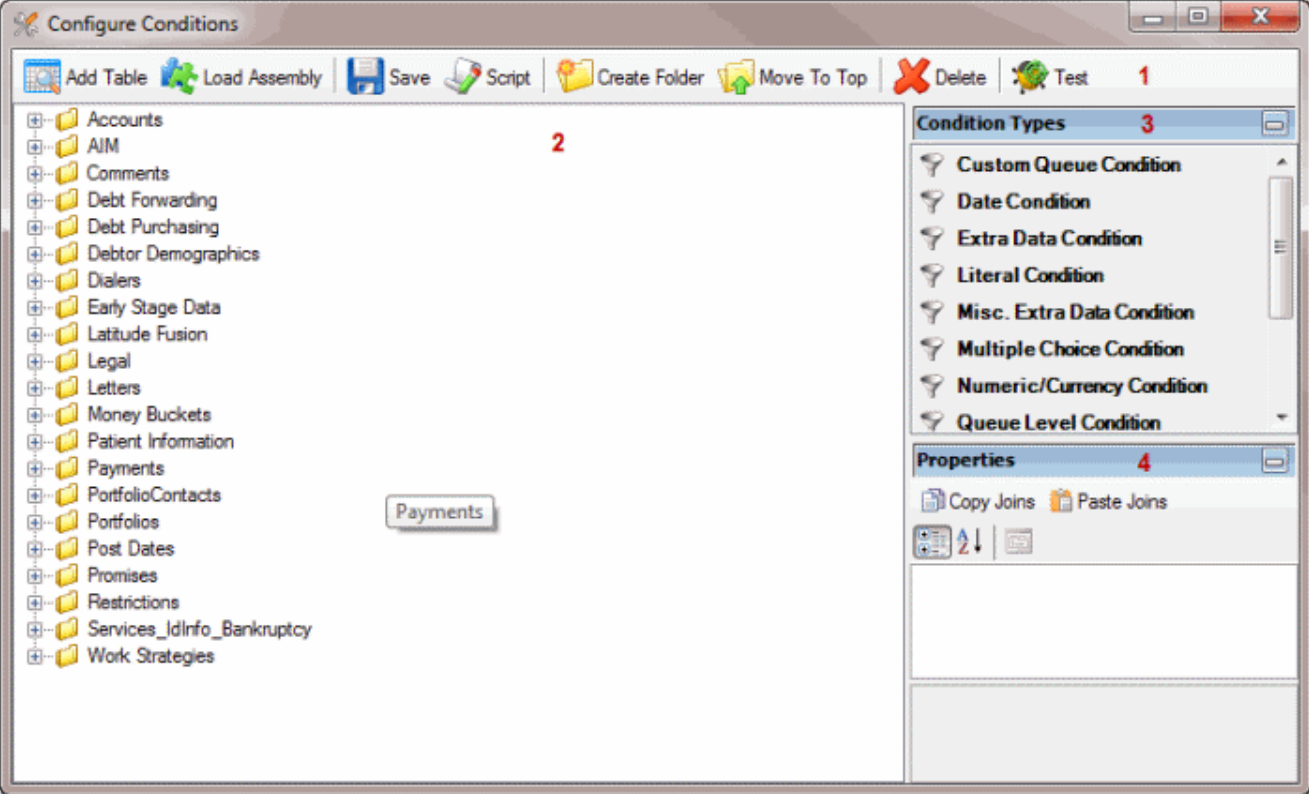
- Toolbar : Provides options for configuring conditions.
| Options | Description |
 |
Opens the Add Table Wizard to allow you to map a Latitude database table or view. |
 |
Adds a .dll assembly file containing conditions that Latitude by Genesys created for your organization. |
 |
Saves the condition configuration. |
 |
Allows you to create a SQL files that contains the specified conditions. |
 |
Allows you to create a folder in the condition Selection. |
 |
Allows you to move a folder or condition. |
 |
Allows you to move a delete or condition. |
 |
Allows you to test a condition to ensure its configured properly. |
- Condition Selection Pane: Provides a list of conditions that are available to users when they create queries. You can add, modify, configure the conditions.
- Condition Type pane: Allows you to add a condition type to the Data Selection pane.(In condition types , Number is marked as 3. There a new condition type is added. )
- Properties pane: Allows you to view and modify the configuration settings for the condition selected in the Data Selection.