


- Contents
Configuration
Uses Configuration options for the portal.
Location
In the Navigation pane, click Applications > Self-Service Portal > Configuration.
Scope
This permission is available for the following scopes:
-
System
-
Business Class
-
Client Group
-
Client
Policy
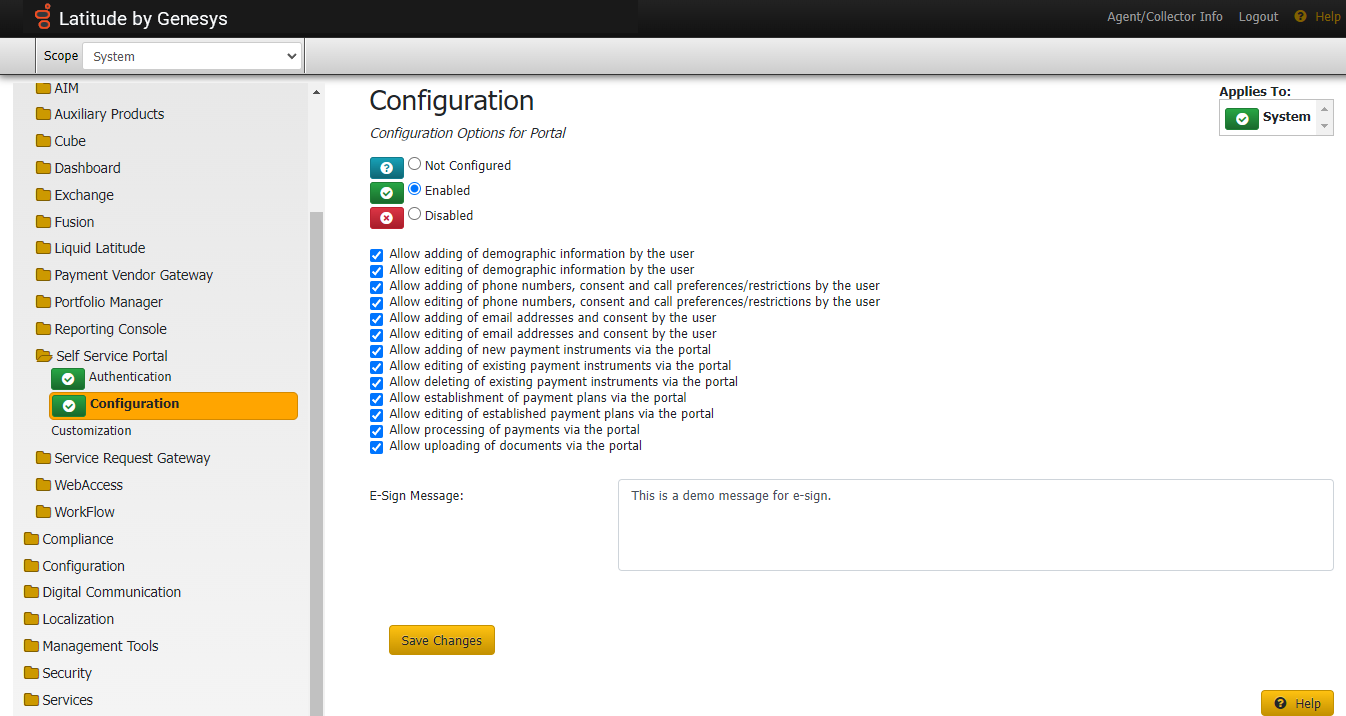
This policy can be used to configure what actions will be performed in self service portal.
a. Allow adding of demographic information by the user.
b. Allow editing of demographic information by the user.
c. Allow adding of phone numbers, consent, and call preferences/restrictions by the user.
d. Allow editing of phone numbers, consent, and call preferences/restrictions by the user.
e. Allow adding of email addresses and consent by the user.
f. Allow editing of email addresses and consent by the user.
g. Allow adding of new payment instruments via the portal.
h. Allow editing of existing payment instruments via the portal.
i. Allow deleting of existing payment instruments via the portal.
j. Allow establishment of payment plans via the portal.
k. Allow editing of established payment plans via the portal.
l. Allow processing of payments via the portal.
m. Allow uploading of documents via the portal.
-
E-sign Message : This change will pop-up the message to users while creating a single payment or setting up a payment plan using a card. Users can only create the arrangement once they approve the message displayed.