


- Contents
Link Console Help
Specify Link Options for a Customer or Class of Business
Use the Options tab to specify the link options for a customer or class of business. If your organization defined default options, these options override the default options.
To specify link options for a customer or class of business
-
In the Navigation pane, do one of the following:
-
To specify options for a customer, expand a class of business and then click the customer.
-
To specify options for a class of business, click the class of business.
-
Click the Options tab.
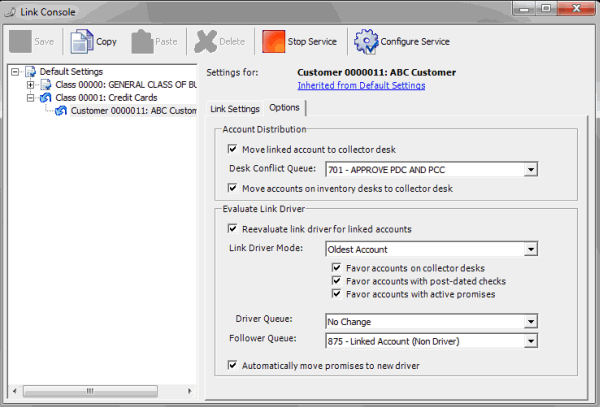
Account Distribution section: These settings determine whether Link Console redistributes newly linked accounts to other desks, and how.
Move linked account to collector desk: If selected, Link Console moves linked accounts to a collector desk after linking. Link Console evaluates all the accounts in the linked group to determine the receiving collector desk. If a collector only worked one account, the desk assigned to that account receives the linked accounts. If there is a conflict (multiple desks, multiple worked), Link Console moves the account to the queue specified in the Desk Conflict Queue list box. If cleared, accounts remain assigned to their current desk.
Desk Conflict Queue: Supervisor queue level (700-799) to receive the linked accounts when multiple collectors have worked the accounts. If you selected the Move linked account to collector desk check box, specify a desk conflict queue.
Move accounts on inventory desks to collector desk: If selected, Link Console moves linked accounts assigned to an inventory desk to a collector desk after linking.
Evaluate Link Driver section: These settings determine how Link Console sets the link driver once it links new accounts. The link driver is the only account that is queued for collection within the group of linked accounts. You can only set one account as the link driver in the linked group, and that account must have an active status.
Note: Evaluation of the account link driver resets the queue date automatically. Link Console sets the queue date to the current date, unless a collector worked the account today. If a collector worked the account today, Link Console sets the queue date to the following day.
Reevaluate link driver for linked accounts: If selected, your organization wants the link driver set (or reset) for accounts that Link Console just linked.
Link Driver Mode: Account within the group of linked accounts to set as the link driver. If you selected the Reevaluate link driver for linked accounts check box, specify an account.
Note: If you selected any of the following check boxes, Link Console ignores the Link Driver Mode setting.
Favor accounts on collector desks: If selected, Link Console weighs the account link driver toward an account in the group that belongs to a collector desk.
Favor accounts with post-dated checks: If selected, Link Console weighs the account link driver toward an account in the group with post-dated checks assigned.
Favor accounts with active promises: If selected, Link Console weighs the account link driver toward an account in the group with active promises.
Driver Queue: Queue level to set on the link driver account.
Follower Queue: Queue level to set on follower (non-link driver) accounts.
Automatically move promises to new driver: If selected, Link Console moves existing promise, PDC, and credit card arrangements from a follower account to the link driver account when the link driver account changes.
-
Complete the information and then, in the toolbar, click Save.