


- Contents
Goal Manager Help
Clone the Goals
Use the Clone Goal page of the Goal Wizard to specify the parameters for cloning goals. This page only displays if you selected the Clone option on the Goal Context page. Otherwise, the Previous Goal Information page displays.
To clone the goals
-
Ensure that you have the Cone Goal page displayed.
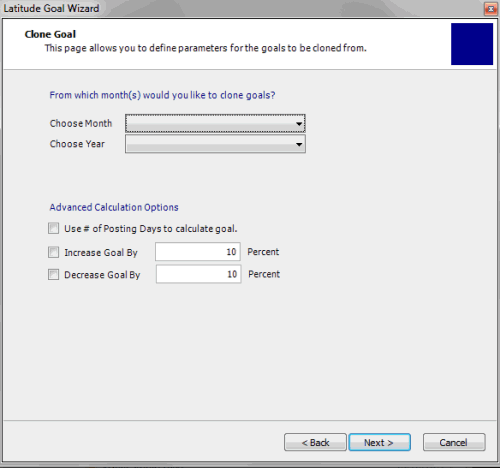
Choose Month: Month from which to clone goals.
Choose Year: Year from which to cone goals.
Use # of Posting days to calculate goal: If selected, set the goal using the calculated the number of posting days in the month. If cleared, set the goal using the number of posting days in the cloned month.
Increase Goal by: If selected, increase the cloned goal based on the specified percent.
[Increase] Percent: Percent to increase the cloned goal.
Decrease Goal by: If selected, decrease the cloned goal based on the specified percent.
[Decrease] Percent: Percent to decrease the cloned goal.
-
Complete the information and then click Next.