


- Contents
Goal Manager Help
Specify Goal Settings
Use the Previous Goal Information page of the Goal Wizard to specify goal settings. You can specify whether to set the goals for each company or desk, or set the same goals for all. This page only displays if you selected the New option on the Goal Context page. Otherwise, the Clone Goal page displays.
To specify goal settings
-
Ensure that you have the Previous Goal Information page displayed.
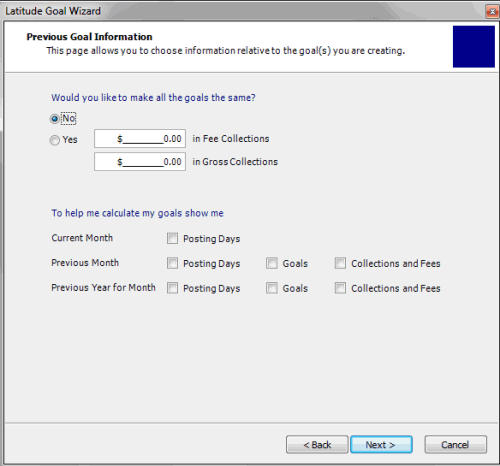
Would you like to make the goals the same
No: If selected, indicates that you want to set the goals for each company and desk individually.
Yes: If selected, indicates that you want to set the same goals for all companies and desks. Provide the goal dollar amounts for fees and gross collections.
Note: You can set the same goals for all, and then modify individual companies and desks on the Goal Worksheet page.
Current Month
Posting Days: If selected, displays the number of posting days for the current month.
Previous Month
Posting Days: If selected, displays the number of posting days for the previous month.
Goals: If selected, displays the goals for the previous month.
Collections and Fees: If selected, displays the actual collection and fee amounts for the previous month.
Previous Year for Month
Posting Days: If selected, displays the number of posting days for the previous year and current month.
Goals: If selected, displays the goals for the previous year and current month.
Collections and Fees: If selected, displays the actual collection and fee amounts for the previous year and current month.
-
Complete the information and then click Next.