


- Contents
PureConnect Analytics
Data Pipeline Configuration Settings
The Data Pipeline configuration settings are found in Interaction Administrator under System Configuration.
To restrict which user, workgroup, or role has access to configure the Analytics configuration settings, see Administrator Access.

Data Pipeline Configuration dialog
The Data Pipeline configuration settings are found in Interaction Administrator under System Configuration > Analytics..
In the Data Pipeline workspace, click Configuration. The Data Pipeline Configuration dialog is displayed.
Data Pipeline Server page
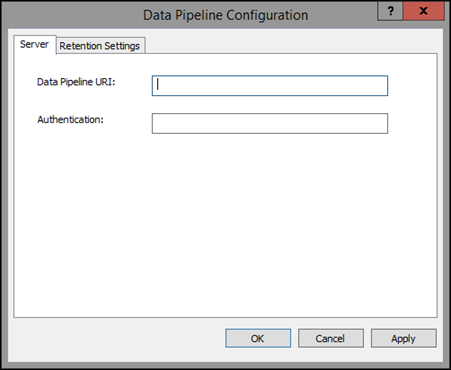
Configure the following parameters on the Data Pipeline Server page.
| Data Pipeline URI | This is the host address of the component endpoint in the cloud. |
| Authentication | This is the connection secret key. |
Data Pipeline Retention Settings page
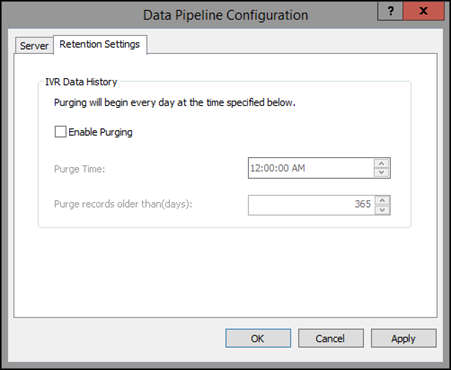
Configure the following parameters on the Data Pipeline Retention Settings page.
| Enable Purging | If this check box is selected, data will be purged on the specified
time and day.
If this check box is not selected, a default period of one (1) year is considered for purging. |
| Purge Time | In the Purge Time box, select the time to run the purge job. The default is 12:00:00 AM (midnight). |
| Purge records older than (days) | Enter the number of days for records to be older than, to be
purged.
The number of days can be set from 1 day to 2147483647 days. The default is 365 days (1 year). |
Note: Purges occur at the set time when a record is older than the set amount of days.