


- Contents
Interaction Designer Help
Choosing an Operator
The box on the left contains a list of operator categories to select from when building your expression. If you select the Variables category, you see a list of variables of the expected type in the Symbols and Values list. If you choose the Literal Values category, you'll see a list of literal values to choose from. Selecting Mathematical operations displays a list of mathematical operations to choose from.
The Expression Editor Assistant limits your choice in variables and operations to those that are of a type valid for the parameter. For example, if the parameter accepts only a Boolean variable (true or false), then the only variables that appear in the Variables list are variables of type Boolean. The only expressions you can build are those that result in a Boolean value.
The first category to choose from is Variables. You can assign a variable as the value of a parameter. To select a variable as the value of a parameter, click on the Variable category. A list of variables appears on the choices box. Double-click on the variable you want to assign as the value of the parameter. That variable appears in the Expression field.
Typing values for operands
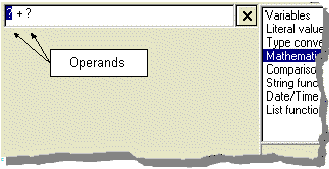
Once you've selected a category that contains operations, you can select an operator from the list of choices that appear. For the Mathematical Operators, your choices are "-, *, /, ^, +, Abs, and Mod." Double-clicking on an operator places that operator in the expression field. The "?" symbol that appears on either side of the operator are operands. These are placeholders for values that complete the expression. The following figure shows two operands for the "+" operator. It is in these operands that you will place the values for the expression.
You can enter values or build sub-expressions for operands just as you would for a parameter. The only limit is that the end result of the entire expression must be of a type valid for the parameter.
Related Topics