


- Contents
ACD Processing Technical Reference
Other ACD Specifications
Note:
Some of the ACD variables referenced here require the use of handlers,
and therefore are not available without an Intermediate or Advanced Server
license.
Agent Utilization
CIC allows agents to handle multiple phone calls, emails, and chats simultaneously, in any combination. You can set percentages for each type of interaction in Interaction Administrator (Figure 4). An agent is considered available as long as the sum of the percentage utilizations is less than 100. Suppose the system configuration indicates that phone calls have a percentage utilization of 51%, chats 25%, and emails 10%, then an agent could simultaneously process four chats, or one phone call and up to four emails, or two chats and five emails, and so on.
You can also set a maximum number of each interaction type. This number indicates the maximum number of that type of interaction that an agent can receive. Suppose that the system configuration indicates that chats have a percent utilization of 25 and a max. assign. of 2, then each agent could only have a maximum of two chat interactions at any given time, even though that would still leave the agent's total utilization at 50%.
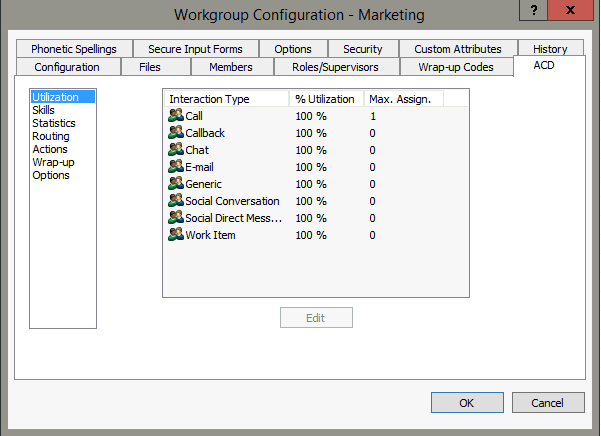
You can use Percent Utilization and Maximum Assignment together to allow utilization of agents at their maximum efficiency, while avoiding the confusion that could be caused by having an agent assigned too many of a particular interaction type. For example, you could decide that one phone call might only occupy 30% of your agents' total resources. However, it is unreasonable to expect them to be able to field more than one phone call at any given time by setting the Percent Utilization for calls to 30 and the Max. Assign. to 1. An agent with one phone call is still be 70% available for emails, chats, and so on, but is not available for any other phone calls.
The default value for each type of interaction is the Agent Utilization value specified for the media type in the Media Types Configuration. Any interaction type not assigned a utilization percentage and/or maximum assigned number in the user’s configuration page uses the value set in the workgroup configuration. Values assigned in a user’s configuration always overrides the values set in any workgroups to which that user belongs. The icon to the left of each interaction type indicates whether that value was set in the user’s configuration page or inherited from a workgroup. On the ACD tab of the User Configuration dialog, under Utilization, the Inherited column indicates the workgroup from which values are inherited.
Any agent that is under 100% utilization is still considered available for any further interactions (except interactions that have already met their maximum assigned limit), as long as the newest interaction would not put the agent over 100%. However, an agent’s time available is reset each time a new interaction is assigned.
For example, two agents, Agent A and Agent B, are each about to begin their shift. Both agents have identical settings and percent utilizations as follows: calls 51%, chats 25%, and emails 10%. For simplicity’s sake, assume that these two agents will only receive chats. Agent A logs on and has no interactions. Shortly afterward, Agent B logs on and also has no interactions. A new chat comes in and goes to Agent A because Agent A has been available the longest. A second new chat comes in and goes to Agent B. Even though Agent A is still 75% available, the second chat goes to Agent B because Agent A's time available was reset when the first chat was assigned to him or her. That means that Agent B now has the longer time available. When a third incoming chat is routed, it goes to Agent A since Agent A’s last interaction came in before Agent B’s.
Utilization is no longer honored once an interaction enters a conference or enters an ACD queue as the consult segment of a consult transfer. If an interaction is transferred to an ACD queue, utilization is only honored if the interaction is blind transferred to the ACD queue.
Note:
An agent who receives interactions from multiple workgroups is limited
to the highest maximum assignable value for the workgroups, even if not
at maximum utilization. For example, suppose an agent receives email interactions
from Workgroup A and Workgroup B. The maximum assignable value for email
interactions in Workgroup A is 20, while the maximum assignable value
for Workgroup B is 15. The agent cannot receive more than 20 total email
interactions.
Wrap-up Time
Wrap-up time indicates the number of seconds between when an interaction ends and the agent is available to receive a new interaction. A value of 180 seconds allows call agents three minutes between the time they end a call and the time they are available to take a new call. You can set the grace period in the Wrap-up section of the ACD Actions page of the Workgroup Configuration container by selecting Wrap Up in the Status field and entering the desired number of seconds in the Time (sec) field. If you don’t specify a time, then each workgroup member is available to receive interactions as soon as the current interaction disconnects.
Exempt Held Interactions
Checking this box allows an agent to go back to available status after
placing an interaction on hold. By default, this option is disabled and
the options beneath it box are not available. When you use the option
with the Agent Utilization feature, then a set number of interactions
(see Max Number of exempt interactions
below) placed on hold does
not count toward the agent’s total utilization.
Note:
However, held calls still count toward the maximum number of interactions
that an agent can have.
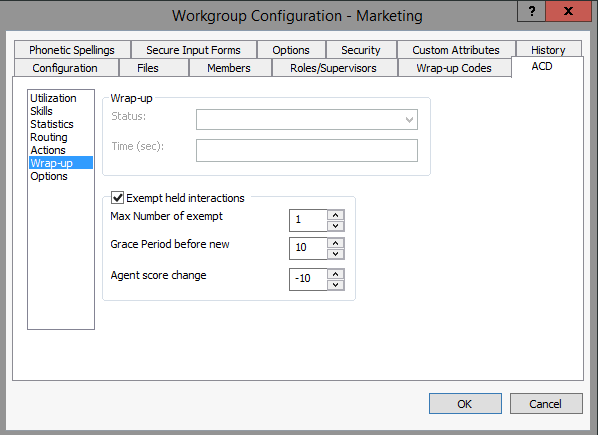
Allowing an agent to receive new calls after he or she places a call on hold has the potential to bog down agents in certain circumstances. To prevent this situation from happening, three fields become available when on hold activity is selected to ensure smooth call activity:
-
Max Number of exempt interactions
-
indicates the total number of held calls that do not count toward the agent’s percent utilization. More calls can still be placed on hold after this number is reached, but they will count toward the agent’s total utilization.
For example, consider an agent configured so that calls count as 50% of his or her total utilization and his or her Max Number of exempt interactions is 1. This agent receives one call, which raises his or her utilization to 50%, then a second call raises it to 100%. He or she is not available now to receive any further interactions. After he or she places the first call on hold, agent utilization drops back to 50% and the agent is able to receive a third call, raising utilization back up to 100%. The agent then places the second call on hold, and now has two held calls and one active call. However, because his or her Max Number of exempt interactions is 1, and this is the second held call, the percent utilization is not calibrated and the total utilization remains at 100%.
-
Grace period before new interaction
-
is the number of seconds that will elapse before the agent’s availability is reset after the interaction is placed on hold. This operates similar to Wrap Up Time described above except that there is no visible status change.
-
Agent score change per interaction
-
lowers the agent’s priority by a set amount for each interaction placed on hold. This option is useful for allowing agents with no interactions on hold to receive interactions before agents with interactions on hold.
Note:
You can enable this functionality for all interaction types except calls so that calls placed on hold still count toward the agent’s total utilization, but any other type of held interaction does not count. To enable the functionality, go to the System Parameters container under System Configuration. Add the parameterACDDisableOnHoldProcessingForCallsand assign it any non-blank value.
Overflow Queues and In-Queue Time Limit
In the ACD Select Item tool, you can configure the In-Queue Time Limit. If an interaction is waiting for an amount of time greater than the In-Queue Time Limit, an event is generated. What happens to that interaction after that is up to you. One of the initiators that Customer Interaction Center includes is the ACD Queue Item Timeout initiator. Any handler containing this initiator starts when an interaction goes unanswered longer than the In-Queue Time Limit.
You could decide to move that interaction into an ACD queue with many agents spanning multiple queues. You could also decide to send an email message to someone, indicating that an interaction has been waiting longer than the In-Queue Time Limit. You could even use the event to alert a call center manager. Customer Interaction Center is flexible in allowing you to customize what happens when an interaction reaches the In-Queue Time Limit.
Note:
The ACD Server has no default behavior to deal with interactions that have
timed out. If you want to use In-Queue Time Limit, you must be sure that
something is in place to handle the timed-out interactions.
Estimating Hold Times
Two useful ACD tools are ACD Statistics (Interaction) and ACD Statistics (Queue). These tools return statistics pertinent to the interaction or queue, including estimated hold times, each interaction’s position in the queue, and the number of agents available to answer an interaction. What you do with this information is limited only by the handler you build. For example, you could use this information to play recorded messages telling callers their wait time. You could also use the information for reporting purposes to track your call center’s performance. You could also use the information to alert a call center manager when estimated hold times exceed an amount of time you configure.
ACD Wait Reason
ACD Wait Reason is a call attribute (Eic_ACDWaitReason) that indicates why an interaction is waiting for an agent.
When ACDServer processes an interaction but cannot handle it right away, the interaction goes into an ACD-Wait Agent state. The value of this attribute could change each time ACDServer considers the interaction. For example, when the call is first considered, there might not be available agents. The second time the call is considered, perhaps no agents have the appropriate skill, and so on. The value of this attribute is updated each time the interaction is considered but not routed to an agent.
The possible reasons are:
-
No available agents
-
No agents with necessary utilization
-
No available agents for this media type
-
No available agents in category
-
No available agents with skill
-
No available agents for skill and min/max proficiency
-
No available agents for skill and min/max desire
In Interaction Supervisor, the SupSystem Supervisor plug-in can display
the value of ACD Wait Reason as a column in the Call Activity
View. For details, see Call Activity View
in the System
Monitoring Guide (sys.chm).