


- Contents
Automated Speech Recognition Technical Reference
Add a Command Server for Loquendo or Nuance
Use the Enter Configuration for new Command Server page to add a Command Server for Loquendo or Nuance.
To add a Command Server for Loquendo or Nuance
-
In the toolbar of the Status page, click Config. The Configuration page appears with the Servers tab selected.
Note:
Since the Loquendo and Nuance ASR Server configurations are the same, the following Nuance example functions for both Nuance and Loquendo.
- Click Add Server. The Enter Configuration for new Command Server page appears.
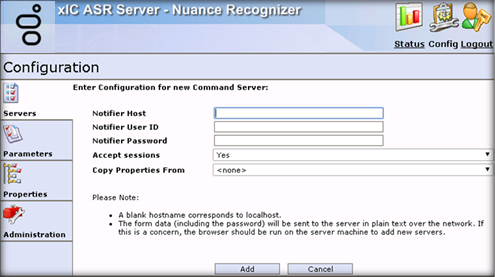
Notifier Host: CIC server name or IP address in this connection.
Notifier User ID: User name of the CIC user account that the ASR server uses to log on to the CIC server.
Notifier Password: Password for the CIC user account that the ASR server uses to log on to the CIC server.
Accepts Sessions: Indicates whether the ASR server accepts requests from the specified CIC server.
Copy Properties From: Existing ASR server connection definition from which to copy the settings, including property settings, for this new server.
Add: Saves the Command Server configuration.
-
Complete the information and then click Add.