


- Contents
CX Insights Installation and Configuration Guide
Configure Access Control for CX Insights dashboards
You can restrict which user, workgroup, or role has access to specific dashboards.
To assign dashboard access:
-
In Interaction Administrator, go to the User, Workgroup, or Role properties dialog.
-
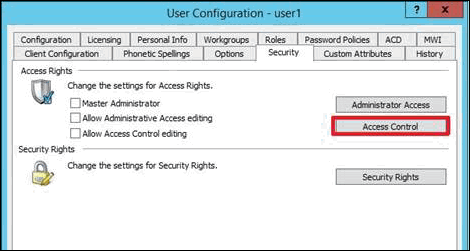
Select the Security tab.
-
Click Access Control.
-
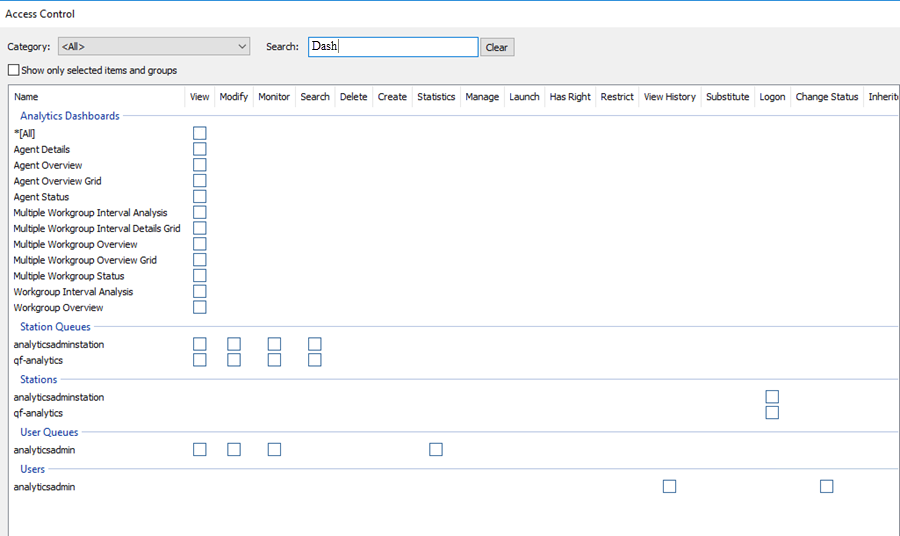
In the Access Control dialog, type dashboards in the search field to filter the list.
Note:
If the IC Server is in sync with the MicroStrategy server, then you can see the check boxes for all the dashboards.
-
To assign a user, workgroup, or role access to the dashboard, select the dashboard check box, or select All to assign access to all dashboards. Clear a check box to remove the privilege.
-
Click Close.
-
Click OK or Apply to save settings.