


- Contents
Gmail Integration Technical Reference
Configure the Google Domain
-
Register your domain name with Google, such as
yourcompany.acme.com. -
Log in to the Google domain using your domain administrator account to set up the domain to use Google Apps for Work.
-
After you log in to the dashboard (or portal) for administering your account, access the Admin console (for example, access
admin.google.com). -
Select Security.
-
Select Advanced settings.
-
Under Authentication, select Manage OAuth Client Access.
-
Enter the following information in the Manage API client access screen:
-
In the Client Name field, enter the client ID from the Create Google Project and Service Account procedure.
-
In the One or More API scopes field, enter
https://mail.google.com/.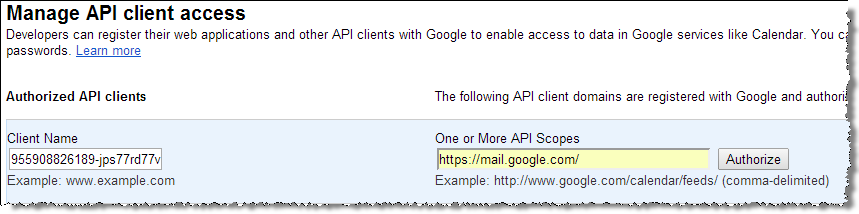
-
-
Click Authorize.