


- Contents
PureConnect Installation and Configuration Guide
Create managed IP phones and associated SIP stations
After lines and line groups are created, you should create managed IP phones and SIP stations. We recommend that you create managed IP phones and associated SIP stations for the Polycom, Interaction SIP Station, SIP Soft Phones, AudioCodes, and Genesys phones in your implementation following the CIC server installation.
The CIC provisioning subsystem on the CIC server manages the configuration of Polycom phones, Interaction SIP Station phones, SIP Soft Phones, AudioCodes, and Genesys phones for the purpose of reducing initial IP phone configuration time and ongoing maintenance. The CIC provisioning subsystem manages the CIC features available on each phone, and also updates the firmware and manages resetting the phones as needed.
The Managed IP Phones container in Interaction Administrator holds all Polycom phones, Interaction SIP Station phones, SIP Soft Phones, AudioCodes, and Genesys phones managed by the CIC provisioning subsystem. The Managed IP Phones container also contains templates to create new managed IP phones and the SIP stations associated with each, as well as registration groups for organizing phones according to the sources of registration data.
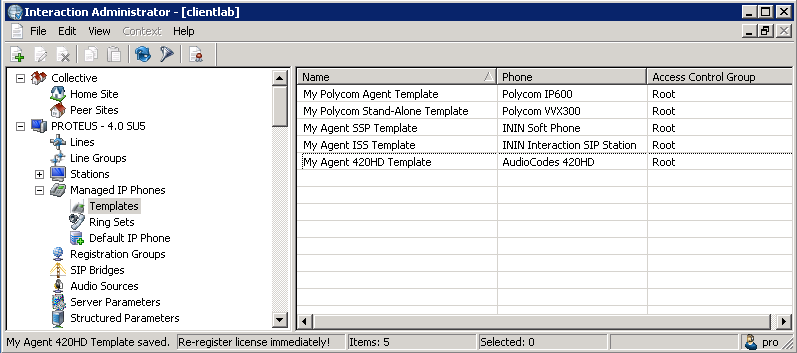
The CIC Managed IP Phones Administrator's Guide in the PureConnect Documentation Library provides the complete instructions for creating managed IP phones and associated SIP stations, including:
-
Configure the network for managed IP phones
-
Create individual managed IP phones for test purposes
-
Create multiple managed IP phones using a CSV Managed IP Phone list
-
Polycom administration: Additional configuration, troubleshooting, and boot and provision sequences
-
Interaction SIP Station I & II administration: Set up, additional configuration, troubleshooting, and boot and provision sequences
-
SIP Soft Phone: Setup and configuration, troubleshooting, and setup and provision sequences
-
AudioCodes and Genesys phone administration: Additional configuration, troubleshooting, and boot and provision sequences
-
How registrations work (proxy settings)