


- Contents
PureConnect Installation and Configuration Guide
Mail provider summary
After you have selected mail providers and clicked Next in the Select Mail Providers screen, a progress bar appears showing that IC Setup Assistant is gathering mail provider information.
When completed, the Mail Provider Summary screen appears. Verify that the mail provider entries are correct. If multiple mail providers are listed, verify that the default ordering for directory searches and transport delivery services is correct.
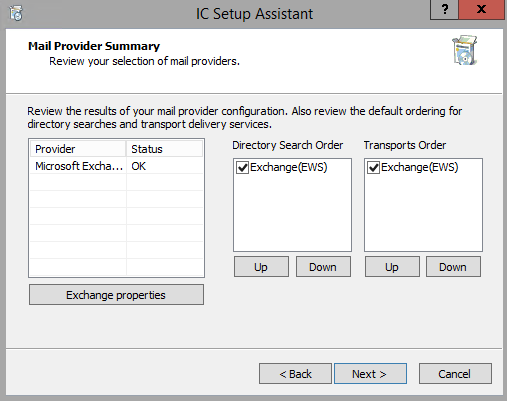
Provider
Lists the selected mail provider(s).
Status
A mail provider's status is marked as Not present if the appropriate mail connector is not registered and therefore unavailable. One reason for the Not present status may be that the mail provider client is not installed on the CIC server, if that is a requirement.
Exchange Properties
Select the Exchange properties button to access the Exchange Configuration screen to configure Exchange Web Services (EWS). EWS is initially enabled by default. Disable Exchange MAPI because it is no longer supported.
See "Configure CIC for Exchange Web Services" in "Mail System" for instructions on filling out the Exchange Configuration screen.
Directory Search Order
The directory contains the lookup information for contacts (first name, last name, etc.) This column shows the default order of mail provider directories that CIC will use to search for a user's mailbox.
-
If you selected Microsoft Exchange Server as the mail provider, Exchange Web services EWS is initially enabled by default. Disable Exchange MAPI because it is no longer supported.
-
Interaction Message Store will not be listed because it does not maintain any contact information.
-
If you defined more than one LDAP directory, each is listed.
To change the directory search order, highlight a mail provider directory and use the Up and Down buttons to move the directory.
Transports Order
The SMTP transport handles the delivery of mail. This column shows the default order of mail provider transport vehicles that CIC will use to search for a user's mailbox.
-
If you selected Microsoft Exchange Server as the mail provider, Exchange Web services EWS is initially enabled by default. Disable Exchange MAPI because it is no longer supported.
-
If you defined more than one SMTP transport, each is listed.
To change the directory search order, highlight a mail provider transport and use the Up and Down buttons to move the directory.