


- Contents
PureConnect Integration with Genesys Intelligent Automation Technical Reference
Configure Reverse Proxy Rewrite Rules
If you indicated to use a reverse proxy for Genesys Intelligent Automation in the Chatbots section of the Widgets tab, configure the reverse proxy rewrite rules. If you use the same reverse proxy for CIC Web Applications, place the Genesys Intelligent Automation rewrite rule before the CIC Web Applications rule.
Use the following rewrite rule examples.
Apache
# Make sure the rewrite engine is turned on.
Omit this if it’s already set elsewhere.
RewriteEngine On
# TODO: Set the port to the appropriate value
after $2 if necessary.
# If using https, update the URL accordingly.
RewriteRule "^(/.*|)/api/([^/]+)/fish-messaging/(.*)" "http://$2/fish-messaging/$3"
[P]
Nginx
## Intelligent Automation Proxying
location ~* (?:^(.+)/api|^/api)/([^/]+)/fish-messaging/(.+)$ {
set $iaServer $2;
set $iaPath $3;
# TODO: Set the port to the appropriate value after $iaServer
if necessary.
# If using https, update
the URL accordingly.
proxy_pass http://$iaServer/fish-messaging/$iaPath;
}
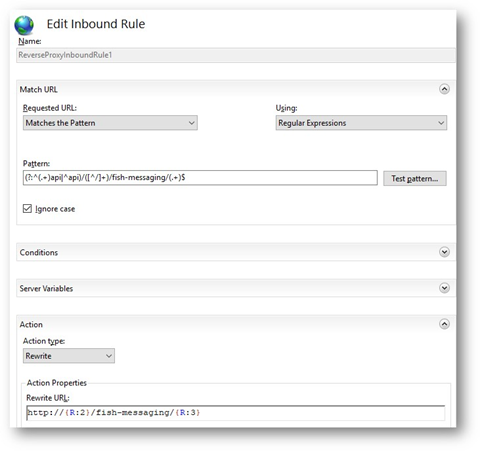
IIS
Match URL
Requested URL => “Matches the Pattern”
Using => “Regular Expression”
Pattern => (?:^(.+)api|^api)/([^/]+)/fish-messaging/(.+)$
Ignore Case => On
Action
Action type => “Rewrite”
Action Properties
Rewrite
URL => http://{R:2}/fish-messaging/{R:3}
TODO:
Set the port to the appropriate value after {R:2} if necessary.
If
using https, update the URL accordingly.
IIS inbound rule
For more information about reverse proxy configuration for CIC Web Applications, see the CIC Web Applications Installation and Configuration Guide.