

- Contents
Managed IP Phones Administrator Guide
Create DNS Host (A) Records for Servers in the DNS Voice Domain
Create a DNS Host (A) record for each server in the DNS voice domain (for example, CIC server(s), media server, proxy server). This procedure is necessary because Genesys is administering the DNS records manually instead of allowing dynamic registrations. You must be familiar with DNS server configuration and have required domain administrator permissions to complete the network configuration procedures.
To create a DNS Host (A) record
-
Right-click on the new DNS Forward Lookup zone for voice (in this example,
lab.voip) and then click New Host (A or AAAA)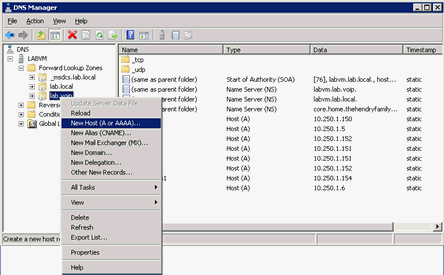
-
In New Host dialog box, complete the following information.

Name: Name of a server in the DNS voice domain (in this example, the CIC server
vm40ic1).IP address: IP address of this server (in this example,
10.250.1.151). You can verify the IP address value for the selected server on the voice VLAN by typing ipconfig in the command-line on the server.Create associated pointer (PTR) record: If selected, the system creates an associated pointer record for the new host. Ensure that you select this check box.
-
Click Add Host. A message appears, indicating that the host record (in this example,
vm40ic1.lab.voip) created successfully. -
Click OK.
-
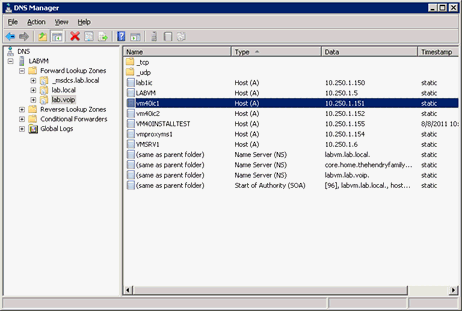
Repeat the previous steps to create records for the second CIC server, Proxy Server, Media Server and other servers to include in the DNS voice domain. When finished, the records you created are available in the voice VLAN forward look up zone (in this example,
lab.voip) container.