


- Contents
Interaction Media Server Technical Reference
Interaction Media Server Call Recordings and Failover
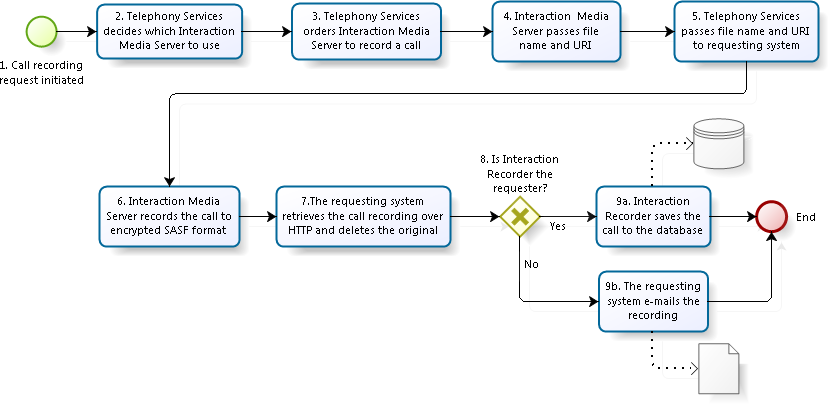
The following flowchart and table describe how Customer Interaction Center uses Interaction Media Server for call recording:
|
Item |
Description |
|
1 |
Customer Interaction Center receives a request to record a call from Interaction Recorder, an Interaction Recorder policy, a workgroup that records all calls, CIC client software, or a custom handler. |
|
2 |
The Telephony Services component of Customer Interaction Center determines, using Media Server Selection Rules, which available Interaction Media Server records the call.For more information about Media Server Selection Rules, see Interaction Media Server Selection Rules for Audio Processing. |
|
3 |
If you are using the always-in audio path method of handling call audio, Telephony Services instructs the selected Interaction Media Server, which is handling the call, to record the call. If you are using the dynamic audio path method of handling call audio, Telephony Services notifies Customer Interaction Center of an available Interaction Media Server to handle the call audio.Customer Interaction Center then invites that Interaction Media Server into the RTP audio stream to do the requested operation, which could include recording the call. For more information, see Configure "Always-in" or "Dynamic" Audio Path for Interaction Media Server. |
|
4 |
When Interaction Media Server is instructed to record a call, it starts recording and passes a file name and Uniform Resource Identifier (URI) back to Telephony Services. |
|
5 |
Telephony Services passes the file name and URI to the requesting system, so that it can download the recording from Interaction Media Server once it completes the recording. |
|
6 |
If you configure Interaction Media Server to encrypt the call and Interaction Recorder requests a recording, Interaction Media Server creates the recording in the SASF secure audio format.Interaction Media Server creates this file with a unique prefix and an .sasf extension.Adhoc recordings use unencrypted .wav files. If you configure the Interaction Recorder object in Interaction Administrator to compress the call recording, Interaction Media Server can compress the recording using the Opus, GSM, or TrueSpeech codec.If you don't configure the call recording for compression, Interaction Media Server uses the Opus, G.711, or PCM codec.If the Interaction Recorder object has compression set to NONE, the RecordingMimeTypeDefault property of Interaction Media Server sets the compression codec. |
|
7 |
When Interaction Media Server completes the call recording operation, the requesting system retrieves the call recording over HTTP and deletes the call recording from its location on Interaction Media Server.The requesting system can be Interaction Recorder, Interaction Recorder Remote Content Service, a workgroup recording all calls, CIC client software, custom handlers, or others. |
|
8 |
If Interaction Recorder or Interaction Recorder Remote Content Service requests the call recording, it processes the recording differently than if the requester was CIC client software, a custom handler, or a workgroup set to record all calls. |
|
9a |
Interaction Recorder saves the call recording to the database. If you are using Interaction Recorder Remote Content Service, the call recording is stored on the selected Interaction Recorder Remote Content Service server and informs Interaction Recorder of the location for the recording.For more information about Interaction Recorder Remote Content Service, see the Interaction Recorder Remote Content Service Installation and Configuration Guide. |
|
9b |
The requesting system, other than Interaction Recorder or Interaction Recorder Remote Content Service, sends the call recording as an email attachment to the address configured for the requesting system.For example, if an agent uses CIC client software to record a call, the requesting system sends the call recording to that agent. |