


- Contents
Interaction Migrator Technical Reference
Modify Database Configuration in IC Setup Assistant
Run IC Setup Assistant following the Interaction Migrator import ONLY when you are importing from one CIC version on one server to the same CIC version on a different server.
To modify database configuration in IC Setup Assistant
-
Start IC Setup Assistant from the CIC server desktop by selecting Start->Programs->PureConnect->IC Setup Assistant. The
rerun
Setup Assistant Welcome page appears, showing the tasks allowed in a rerun. -
Select the Database option.

-
On the Select a Reporting Option page, select Store all reporting data in a database.
-
On the Database Configuration page, select the database you want to configure: Microsoft SQL Server or Oracle. This example is for Microsoft SQL Server.
-
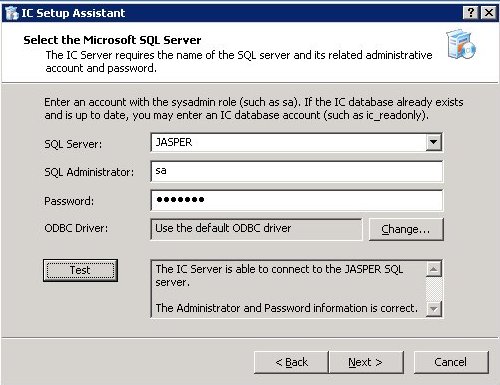
On the Select the Microsoft SQL Server page, select the SQL Server that hosts the CIC database for the CIC server you imported the CIC configuration data file to. Type the appropriate database administrator account and password.
-
On the Configure the CIC Database Name page, select the option applicable to your migration scenario.

- Recovery:
-
Select Use and existing database.
- Migration:
-
We recommend that you test the server with the imported configuration data before moving over to production. Select one of the following options:
-
If you do not want to mix test data and production data, click Use an existing database and type the test database name.
Note:
After testing is complete and before moving over to production, rerun Setup Assistant again and this time point to the (upgraded) database.
-
If you already upgraded the database, click Use an existing database and type the database name.
-
If you have not upgraded the database, click Upgrade an existing database name.
-
-
On the Configure the SQL Database CIC Accounts page, type the passwords for the IC_Admin, IC_User, and IC_ReadOnly accounts.
-
Commit your choices.
-
When IC Setup Assistant completes the configuration, restart your computer.