


- Contents
Oracle Service Cloud Integration Installation and Configuration Guide
Configure incident queue sets (all installs)
This section is specific to incident (email) queue sets. See Configure chat queue sets for information specific to chat queue sets.
To configure an incident queue set:
-
Click the File tab, point to PureConnect, and then click Universal Queue Configuration Utility.
-
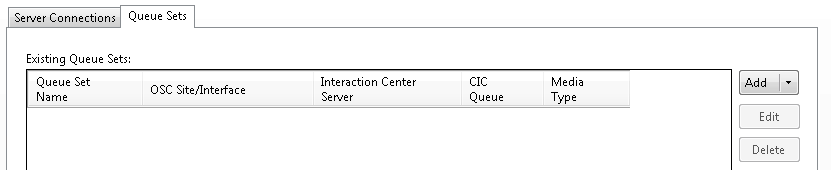
Click the Queue Sets tab. (You may have to click Load Service Configuration to activate the Queue Sets tab.)
-
Click the Add arrow and select Incident Queue Set.
-
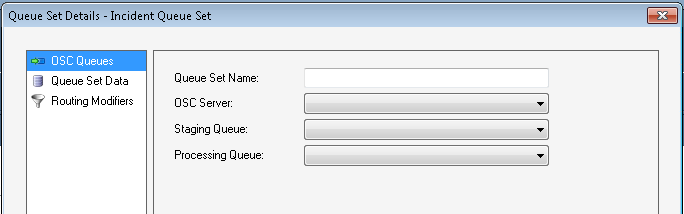
In the Queue Set Details dialog box, add information about the incident queue:
-
In the Queue Set Name box, type a name for the queue set.
-
In the OSC Server list, select the Oracle Service Cloud server.
-
In the Staging Queue list, select a staging queue.
-
In the Processing Queue list, select a processing queue.
-
In the left pane, click Queue Set Data.
-
-
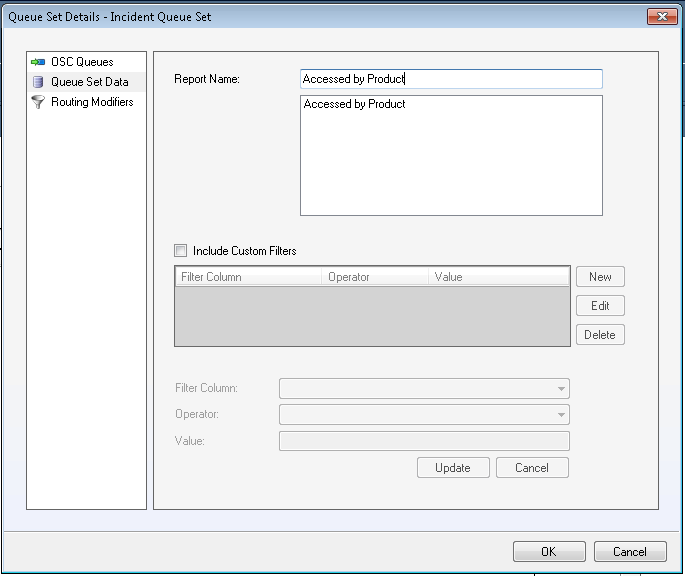
In the Queue Set Details dialog box, click Queue Set Data:
-
In the Report Name box, select the report that you imported earlier (the name you gave to: ININ_EmailReport_<year>_<month>.xml).
-
(Optional) To define custom report filters, select the Include Custom Filters check box. For more information, see the Define custom filters section.
-
In the left pane, click Routing Modifiers.
-
-
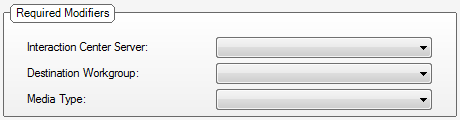
In the Queue Set Details dialog box, select Routing Modifiers:
-
In the Interaction Center Server list, select the CIC server to use.
-
In the Destination Workgroup list, select the destination workgroup of the item.
-
In the Media Type list, select Callback, Email, or Generic Object.
-
Oracle Service Cloud displays the Media Type Details section. The data fields in the section depend on the media type you selected.
-
-
In the Media Type Details section, fill in the information for the media type you selected. For more information, see the Add media type details section.
Note:
Without step 7, Oracle Service Cloud will not display media details correctly to the agent. -
If needed, add modifier rules. For more information, see the Create modifier rules section.
-
Click OK.