


- Contents
PureConnect Reporting Technical Reference
Changing a formula
In this first example, we'll change the average call duration formula to maximum call duration in the standard CIC report template for the User Summary by Date report. Open usersummary.rpt in Crystal Reports. The rpt files are located on the CIC server at I3\IC\Reports.
Important Note
You do not want to overwrite the standard CIC template. Before you begin,
copy the report to a new working location, or from the File menu,
click Save As, and save the report under a new name.
- Right-click the average call duration field located in Group Footer
2, and select Edit Formula on the drop-down menu as shown in
the following figure.
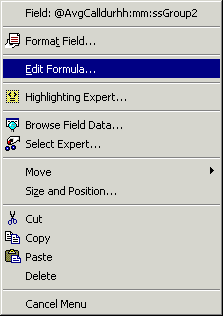
Right-click a field to show the available actions.The associated dialog box is displayed.
The Formula Editor allows you to change the existing formula.
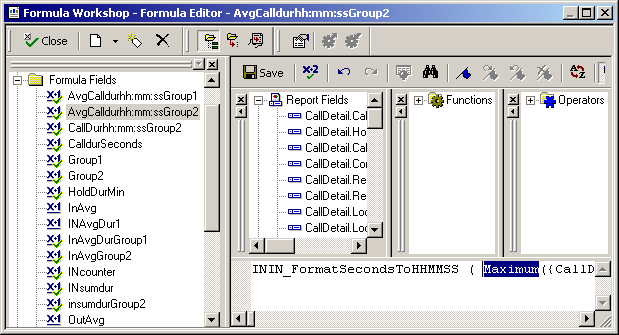
- In the Formula Editor, highlight Sum and type Maximum. Delete all characters beyond the "/". The formula should now read as follows:
ININ_FormatSecondsToHHMMSS ( Maximum({CallDetail.CallDurationSeconds},{@Group2})
-
Right-click the formula name and change it to reflect Maximum instead of Sum. Save your changes.