


- Contents
CIC Integration with SAP CRM Installation and Configuration Guide
Generate a log file in ASCII text format
SLD registration requires that the SapIciWeb.log log files generated by the SAP Integration Web Connector be converted from binary to ASCII text format.
Note: Text log files are only required for SLD registration. If your SAP integration doesn't require SLD registration, leave the settings for this plug-in blank to deactivate it.
Once active, the Log To Text Generator plug-in reads the logs and converts them from binary to ASCII text format. This plug-in is executed on a separate thread to prevent the integration from slowing down while the log file generation completes.
-
To enable the Log To Text Generator, open the SAP Integration Service Configuration wizard.
-
Go to Actions > Switch Configuration > Log To Text Generator.
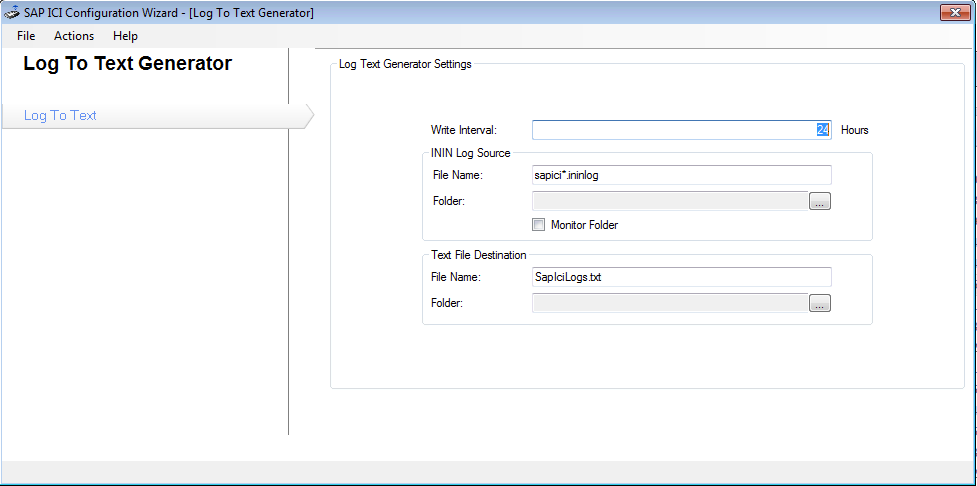
-
Configure the fields using the descriptions in the following table:
Field
Description
Write Interval
Number of hours between each generation of the text log file.
ININ Log Source File Name
Name of the binary source log file to pull into the text log. Wild-card values are allowed.
SapIci.ininlog is the default log file format. Each new log file increments with a number at the end. For example, SapIci_1.ininlog
Folder
Path to the root folder where the web service writes binary logs. Logs are written to sub-folders within this folder based on the creation date. The web service keeps a seven-day history of logs. To minimize the generated text file’s size, the Log to Text Generator only pulls log files from the subfolder of the date on which it is executing.
Monitor Folder
If enabled, the plug-in monitors change events on the current day’s binary log files. Any updates or changes to the files cause the application to create a new text log. Otherwise, the file generates in the period specified by the Write Interval.
Text File Destination File Name
Name of the generated text log file.
Folder
Path to the folder where the plug-in writes the converted text log file.