


- Contents
CIC Integration with SAP CRM Installation and Configuration Guide
Upgrade SAP Integration to use TLS 1.2
Below are steps to use https TLS 1.2 between Integration Server and SAP CRM
- Upgrade to new release //integrations/sap.4.0_su02 that is,
Install both SAPICIWebConnector and SAPICIIntegration MSI files.
- Server SSL certificates must be installed on IIS where SAPICIWebConnector is hosted.
- Get a certificate from the trusted certificate authority.
- Copy the signed certificate you received from the certificate authority to your webserver.
- In IIS Manager, open the Server Certificates Module.
- Click Complete Certificate Request.
- In the Specify Certificate Authority Response Window.
Select the signed certificate you copied to your web server.
Enter a display name for the certificate.
Select the web Hosting for the certificate Store.
Click Ok.
-
Bind the certificates to the https port Security Features of Technical Reference.
- In the connections pane, click the site and then Default website.
- In the Actions pane, click Bindings and then click Add.
- Change the Type to https.
- In the SSL certificate list, select the certificate you previously created or imported and then Click Ok.
- Click Close.
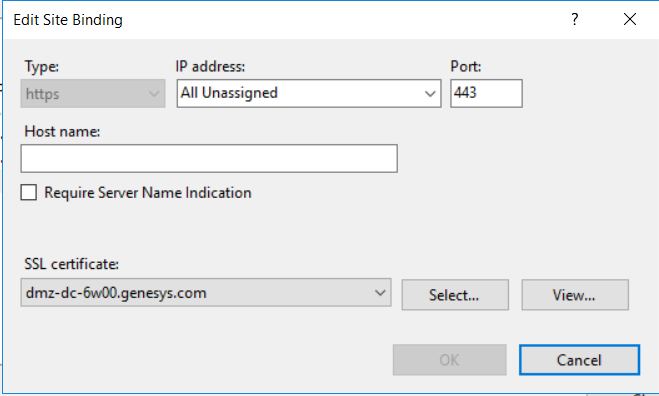
-
Once server certificates are deployed then contact SAP Support team to enable https connection between SAP CRM server and Integration Server as per the integration service. This URL is used to further send events back from the PureConnect to SAP server.
Currently, this is a http url as shown below:
For example here
Once https is enabled, customers must raise a request to SAP to return a https as shown below :
For example here
NOTE: For TLS v1.2, PureConnect and SAP Integration servers must upgrade to .NET Framework 4.7.
-
If customers need both https and http (for backward compatibility) then two RFC connections should be maintained, ININ http (for http) and ININ https (for https) ?
(yes/No) Answer: yes
-
If new RFC connection specific to https is required , who will create it- SAP Team or Customers?
Answer: Generally, the RFC is created by the SAP basis team or the team who is having authorization to perform the task in the SAP system.
-
what are all metadata (like FQDN) you expect from customers for creating new https RFC ?
Answer: For FQDN, refer to SAP Note "1515178 - Use FQDN address instead of IP address on ICI connection".
-
Can https and http connection both work parallel ?
Answer: yes, customers have to reach SAP support team to enable both https and http.