


- Contents
SSO Identity Providers Technical Reference
Enhanced Client or Proxy (ECP) profile
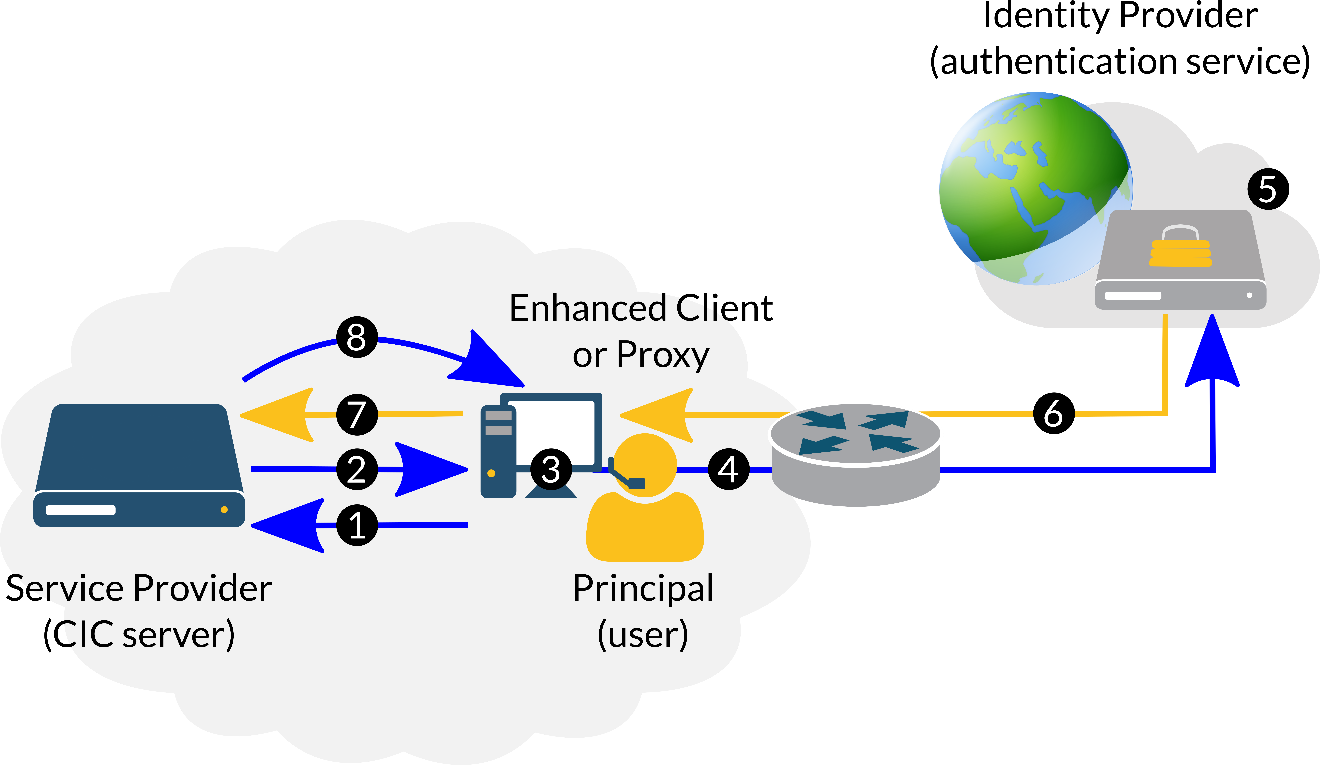
Another profile is the Enhanced Client or Proxy (ECP) profile. Non-web-based CIC applications, such as CIC clients based on the Microsoft .NET Framework, use the ECP Profile.
|
Step |
Description |
|
1 |
The Enhanced Client or Proxy (ECP) attempts to access a resource on the Service Provider, using Principal credentials, through HTTPS protocol. |
|
2 |
The Service Provider sends an <AuthnRequest> message to the ECP. |
|
3 |
The ECP determines which Identity Provider to use for authenticating the Principal credentials. |
|
4 |
The ECP sends the <AuthnRequest> message to the selected Identity Provider using the SAML SOAP binding. |
|
5 |
The Identity Provider authenticates the Principal (user credentials). |
|
6 |
The Identity Provider issues a <Response> message to the ECP. |
|
7 |
The ECP sends the <Response> message from the Identity Provider to the Service Provider. |
|
8 |
The Service Provider either allows or denies the access request to the ECP based on the <Response> message from the Identity Provider. |