


- Contents
Virtualization Technical Reference
Virtualizing PureConnect in Azure
We tested Media Server and CIC server in Azure with the following simulated single customer site:
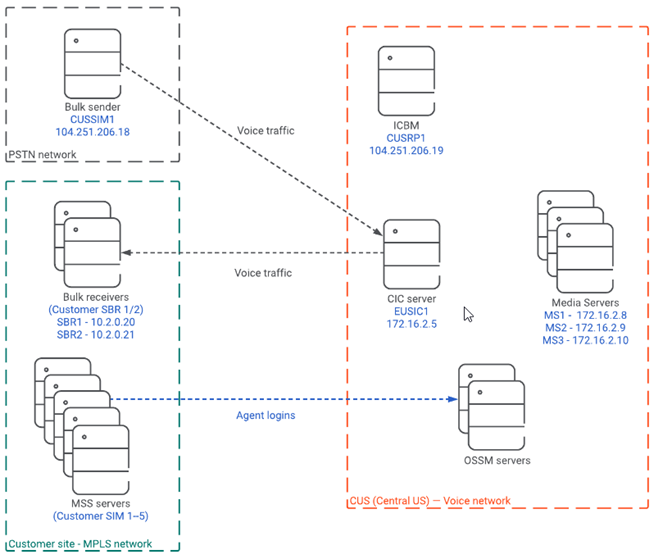
Important: We did not use real MPLS and PSTN networks in this simulation. We simulated these networks inside of our Azure environment. Also, we did not use Session Border in this simulation.
Our PureConnect VMs had the following specifications:
| Type | Azure VM Size | Virtual CPUs | RAM | Operating System |
| CIC server | Standard_D4_v2 | 8 | 28 GB | Windows Server 2016 |
| Media Server* | Standard_D3_v2 | 4 | 14 GB | Windows Server 2016 |
| Off-server Session Manager (OSSM) | Standard_D3_v2 | 4 | 14 GB | Windows Server 2016
|
*Follow recommendations in the Virtualizing Interaction Media Server in a Production Environment section for Media Server configuration.
The test consisted of the following scenario:
|
ACD Agents |
Workgroups | Stations | Recording |
|
2000 |
10 (200 agents/workgroup) | 1500 | 100 percent |
We used Interaction SIP Bulk Caller to:
- Simulate customer calls coming from the PSTN.
- Receive the calls.
- Simulate agent voice traffic from the customer site.
We simulated the MPLS network by using two different subnets and did not consider latency. It is important to note that in the real world latency would be a factor in call quality.
The Virtualizing Interaction Media Server in a Production Environment section recommends keeping call volume at a maximum of 32 Point-Per-Media-Engine (PPME). We used this recommendation to test this environment with call lengths between two and five minutes and monitored metrics such as server load, audio quality, and packet loss. We found all metrics remained within acceptable limits.