


- Contents
WFM Technical Reference
Starting, stopping, and restarting the Historical Service
If you make configuration changes in WFM Historical, you might need to restart its Windows Service. WFM usually prompts you to stop or restart the service. The WFM Actions menu lets you start, stop, and restart the Windows WFM Historical Service from within your WFM software. Previously, you did this through Windows Service.
To start, stop, or restart the Windows Service for WFM Historical
-
On the Actions menu, point to Services, then point to the module you want to start, stop, or restart.
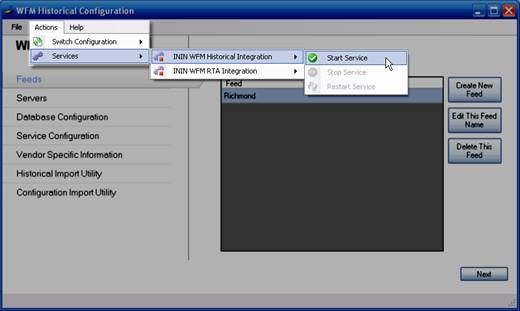
-
On the submenu, click Start Service, Stop Service, or Restart Service. WFM starts, stops, or restarts the Windows Service as directed. WFM displays a message that confirms the result of your action.