


- Contents
PureConnect Installation and Configuration Guide
SIP Lines and Default Registration Group
IC Setup Assistant automatically creates three permanent internal SIP lines for station-to-station calls - <Stations-UDP> (default), <Stations-TCP>, and <Stations-TLS>. (SIP lines for outbound calls must be configured manually in the Interaction Administrator Lines container.)
IC Setup Assistant also creates two permanent default registration groups (one for the <Stations-UDP> line and one for the <Stations-TLS> line), necessary for creating managed IP phones and associated SIP stations.
Note:
In CIC 4.0 SU 1, the default transport protocol was changed from TCP to UDP due to support issues such as problems with TCP offloading and large sites impacted by the OS limit of 4000 TCP connections.
Station Lines
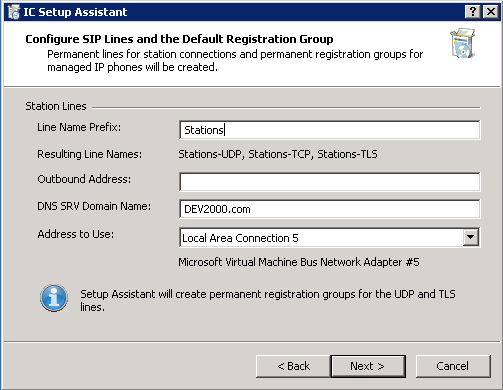
The Station Lines portion of the screen provides information about the SIP station lines that IC Setup Assistant will create.
Line Name Prefix
The line name prefix appears in the SIP line name listed in numerous Interaction Administrator screens, such as Line Configuration > SIP Line Configuration, for example, <Stations-UDP>.
We recommend that you keep the default SIP station line name prefix, Stations. However, if you plan to localize, you may wish to use a different line name prefix.
Important!
Make your line name prefix selection carefully, as lines cannot be renamed.
Resulting Line Names
IC Setup Assistant automatically creates three SIP station lines for different transport protocols: <Stations-UDP>, <Station-TCP>, and <Stations-TLS>. Setup Assistant does not allow any modifications to these lines; any modifications must be made in Interaction Administrator.
<Stations-UDP>
The <Stations-UDP> line is the default transport protocol. Nearly all IP phones support UDP.
IC Setup Assistant automatically sets the <Stations-UDP> line port number to 8060.
IC Setup Assistant sets the <Stations-UDP> line as the default line for a number of SIP stations and managed IP phone settings.
<Stations-TCP>
The TCP station line is available if needed. Most new IP phones support TCP.
IC Setup Assistant automatically sets the <Stations-TCP> line port number to 8060.
<Stations-TLS>
The <Stations-TLS> line is available if your CIC license includes the Advanced Security feature.
IC Setup Assistant automatically sets the <Stations-TLS> line port number to 8061.
Note:
For non-switchover implementations, TLS lines use the <Default Line Certificate> instead of the domain certification.
Outbound Address
Enter a telephone number for one of the lines provided by the telephone company, for example, (919) 872-5555 or 0249581974. Parentheses around area code numbers are optional and any combination of text or numbers may be used (Q = 7 and Z = 9).
This is a required field. The number is used in the "From" header in outbound SIP calls.
DNS SRV Domain Name
Enter the domain name used to formulate SIP-URLs for CIC users and phone numbers. This domain name will be automatically appended to all REGISTER requests sent by CIC.
Note:
Use the DNS SRV domain name, not the computer's domain name.
This value is used in the "From" header in outbound SIP calls.
Address to Use
Select the Network Connection (from the drop down list) that you want to use for outbound SIP calls.
Default Registration Groups
Registration groups are a required attribute of every managed IP phone. (Managed IP phones and associated SIP stations are created post-installation. See "Post-Installation Configuration".)
The registration group controls who the phone registers and communicates with. Each registration group consists of an ordered list of registrations. Each registration points to a line, is specified manually, or is obtained from a SIP proxy or DNS SRV. A managed IP phone will attempt to use the first registration, if it fails, then it uses the second one, etc.
IC Setup Assistant automatically creates two permanent default registration groups:
-
<Default Registration Group> for the <Stations-UDP> line
-
<Default Secure Registration Group> for the <Stations-TLS> line
Depending on your implementation, it may be necessary to modify the registration group configuration post-installation. For more information, see the CIC Managed IP Phones Administrator's Guide in the PureConnect Documentation Library.